Animating in 3D
A 3D effect is still a frame-by-frame effect. Bodies and the camera move a little every frame, either because your code moves them or because they're playing tweens and paths. This chapter covers how they're timed, what a character can read about how it is seen, and how to hand the text back to the ordinary 2D engine once the 3D part is over.
The idea
A body's pose has three parts, and each has its own way to animate:
| Part | Step by step | Over frames |
|---|---|---|
| Rotation | body.rotate("y", 5), body.rotation = ... |
Tweens: spin, settle, turn_to, turn_to_rest, random_pose |
| Scale | body.scale = 2.0 |
Tween: scale_to |
| Position | body.position = ... |
A path: body.motion.new_path(...), as for characters |
- Step by step: your
__next__changes the body directly. You're in full control, frame by frame. Use this when the motion depends on something else in the effect. - Over frames: you describe a change once, such as "two turns about y over 120 frames, easing out", and the world
plays it a frame at a time inside
update(). Use this for motion you can describe up front.
Tweens queue. Each one starts when the one before it finishes, so a body's queue is its script. A tween queued
with together=True joins the one before it and runs at the same time. A body's path runs alongside its tween queue,
independently.
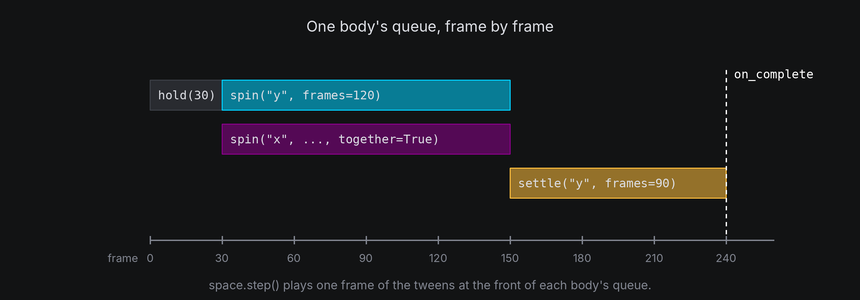
Tweens add their change to the body rather than setting it, so step-by-step calls and tweens combine. A spin keeps turning a body that your code is also nudging. Spins running together combine in the order you queued them, so whole turns that end together finish at the starting pose (see Tumbling).
Each tween and path has a length and an optional easing function, the same ones paths always use (see Motion). Easing changes how the motion is spread over its frames, not how long it takes.
In TTE
The Handoff example flings the text plane far away, brings it back with a spin that settles exactly at rest, and then gives every character an ordinary 2D hop. The 3D part is a few lines:
self.plane.rotation = rotation_about("x", 60) * rotation_about("y", 200)
self.plane.position = Vec3(0, 0, -300)
back = self.plane.motion.new_path(speed=300 / 150, ease=easing.out_cubic)
back.new_waypoint(Vec3(0, 0, 0))
self.plane.motion.activate_path(back)
self.plane.settle("y", turns=1, frames=150, ease=easing.out_cubic)
self.plane.on_complete(self.hand_off)  # hand_off starts the hops.
handoff.py
Save it in your community effects directory as handoff.py.
"""Handoff: the text tumbles in from far away, settles flat, and then hops as an ordinary 2D effect.

An Effect Guide example for the Animating in 3D chapter.
"""

from __future__ import annotations

from dataclasses import dataclass

from terminaltexteffects import Body, Coord, EffectCharacter, EventHandler, Vec3, easing, rotation_about
from terminaltexteffects.engine.base_config import BaseConfig
from terminaltexteffects.engine.base_effect import BaseEffect, BaseEffectIterator
from terminaltexteffects.utils import argutils


def get_effect_resources() -> tuple[str, type[BaseEffect], type[BaseConfig]]:
    """Return the command name, effect class, and configuration class TTE registers."""
    return "handoff", Handoff, HandoffConfig


@dataclass
class HandoffConfig(BaseConfig):
    """Configuration for the Handoff effect."""

    parser_spec = argutils.ParserSpec(
        name="handoff",
        help="The text tumbles in, settles flat, and then hops as an ordinary 2D effect.",
        description="handoff | The text tumbles in, settles flat, and then hops as an ordinary 2D effect.",
        epilog="Example: tte --canvas-width 80 --canvas-height 24 --anchor-text c handoff",
    )


class HandoffIterator(BaseEffectIterator[HandoffConfig]):
    """Produce the frames of the Handoff effect."""

    def __init__(self, effect: Handoff) -> None:
        """Push the text plane away, and queue its return."""
        super().__init__(effect)
        self.world = self.terminal.world
        self.plane = self.world.text_plane
        for character in self.plane_characters():
            self.terminal.set_character_visibility(character, is_visible=True)
            self.active_characters.add(character)

        # Jump away at once, then come back with a turn that ends exactly at rest. The return path's speed is
        # units per frame, so it takes 150 frames, as long as the turn.
        self.plane.rotation = rotation_about("x", 60) * rotation_about("y", 200)
        self.plane.position = Vec3(0, 0, -300)
        back = self.plane.motion.new_path(speed=300 / 150, ease=easing.out_cubic)
        back.new_waypoint(Vec3(0, 0, 0))
        self.plane.motion.activate_path(back)
        self.plane.settle("y", turns=1, frames=150, ease=easing.out_cubic)
        self.plane.on_complete(self.hand_off)
        self.columns: list[list[EffectCharacter]] = []
        self.frame_number = 0

    def hand_off(self, plane: Body) -> None:
        """Put the plane back at rest and give every character an ordinary 2D hop from its input cell."""
        plane.reset()
        for character in self.plane_characters():
            up = character.motion.new_path(speed=0.4, ease=easing.out_quad, path_id="up")
            up.new_waypoint(Coord(character.input_coord.column, character.input_coord.row + 2))
            down = character.motion.new_path(speed=0.4, ease=easing.out_bounce, path_id="down")
            down.new_waypoint(character.input_coord)
            handler = character.event_handler
            handler.register_event(EventHandler.Event.PATH_ACTIVATED, up, EventHandler.Action.SET_LAYER, 1)
            handler.register_event(EventHandler.Event.PATH_COMPLETE, up, EventHandler.Action.ACTIVATE_PATH, down)
            handler.register_event(EventHandler.Event.PATH_COMPLETE, down, EventHandler.Action.SET_LAYER, 0)
        self.columns = self.terminal.get_characters_grouped(order="column_left_to_right")
        self.columns.reverse()

    def plane_characters(self) -> list[EffectCharacter]:
        """Return the characters that ride the plane."""
        return [c for c in self.terminal.get_characters() if c.input_symbol != " "]

    def __next__(self) -> str:
        """Play the 3D return, then start the hops one column at a time."""
        if self.world.animating or self.columns or self.active_characters:
            if self.columns and self.frame_number % 2 == 0:
                for character in self.columns.pop():
                    if character.input_symbol != " ":
                        character.motion.activate_path("up")
                        self.active_characters.add(character)
            self.frame_number += 1
            self.update()
            return self.frame
        raise StopIteration


class Handoff(BaseEffect[HandoffConfig]):
    """The text tumbles in, settles flat, and then hops as an ordinary 2D effect."""

    @property
    def _config_cls(self) -> type[HandoffConfig]:
        return HandoffConfig

    @property
    def _iterator_cls(self) -> type[HandoffIterator]:
        return HandoffIterator
- Setting
rotationandpositionplaces the body at its starting pose at once. - A path's speed is units per frame, so a 300-unit trip at
300 / 150takes 150 frames, as long as the settle. The path and the tween run side by side, so the text turns as it flies in, and both end at rest at the origin. on_complete(callback)runs when the last queued tween finishes, after every body has moved that frame. The example puts the plane exactly at rest withreset()there and starts the hops.- The characters never left the text plane. Once it is back at rest, each one is in its input cell, and an ordinary 2D path from there just works.
Other tweens: turn_to(rotation), turn_to_rest(), scale_to(scale), hold(frames) and random_pose() for
scattered starts. body.animating tracks one body's tweens; camera.animating tracks the camera's;
world.animating is true while any of them has a tween queued or any body is on a path. None of them knows about
characters' own paths, so end the effect on active_characters too (see the frame loop).
What a character sees
character.view reports how a character is seen this frame. Readings are worked out after the world steps, from the
character's place in the world, the camera and the light, so they work for any character on any body:
| Reading | What it is |
|---|---|
cell |
The cell the character projects to |
depth |
Distance along the current view axis, in units: smaller is nearer. Body or camera motion can change it |
nearness |
1 at the nearest point its parent body can reach at its size, 0 at the farthest, measured from the body's center. Moving the body doesn't change it; turning the body or the camera changes which side is nearer |
facing, facing_amount |
Whether the surface where it sits faces the camera, and how squarely, from -1 (away) to 1 |
light |
How directly that surface faces the light, from 0 to 1 |
face |
The face of its parent's surface it is on, as surface.face() takes it, or None |
projected |
Whether it is in front of the near plane; the other readings keep their last values while it isn't |
A character free in the world, on a pivot or on the screen has no surface under it, so it counts as facing the camera in full light.
Scenes can follow two readings with no code in __next__: sync=Scene.SyncMetric.LIGHT picks the frame from light,
and sync=Scene.SyncMetric.DEPTH from nearness, so the near side of a turning body can show a brighter color than
the far side. For anything else, read the view yourself. This thins out characters as they turn edge-on:
def __next__(self) -> str:
    for character in self.letters:
        symbol = "·" if character.view.facing_amount < 0.3 else character.input_symbol
        character.animation.set_appearance_if_changed(symbol)
    self.update()
    return self.frame
Readings in __next__ before update() describe the previous frame, which is what the characters are about to tick
from. Readings in a tween's or path's callback describe the current frame, with every body already moved.
Handing the text back
Text that stayed on the text plane is home as soon as the text plane and camera are back at their starting pose. Text that left it needs attaching back, and a path home (see Coming home):
for character in self.letters:
    character.attach(self.world.text_plane)  # Where it is: no jump.
    home = character.motion.new_path(speed=0.8, ease=easing.in_out_cubic)
    home.new_waypoint(character.input_coord)
    character.motion.activate_path(home)
    self.active_characters.add(character)
After the hand-off, the characters are ordinary characters. Their scenes, colors and layers are what you left them as, so reset anything the 3D part changed.
Lifecycle
body.cancel()discards queued tweens and their callbacks, and keeps the current pose.body.reset()cancels too, and restores the pose the body was made with. Both allow new tweens afterwards.body.erase()stops drawing a body and keeps it in the world.world.remove(body)takes a body out: it stops its tweens and path, stops drawing it, and detaches its children where they are. Removing it again is harmless; a removed body can't be moved or attached to.world.camera.cancel()stops the camera's tweens, andworld.camera.reset()cuts back to its starting view.
Waiting for a group
on_complete(callback) belongs to the last individual tween. Use body.on_group_complete(callback) to wait for the
longest tween in the last queued parallel group. Both run after the camera and every body have moved that frame, so
they read final poses. Groups queued after the hook are independent; cancelling or resetting discards pending hooks.
Camera shots and timing
The camera owns its own queue. A camera group and a body group begin independently; together=True groups actions on
the same owner, not across the camera and a body. Two actions on the camera that start together capture the same
starting pose before either applies a frame. In particular, a simultaneous pan does not alter the forward axis captured
by dolly_by.
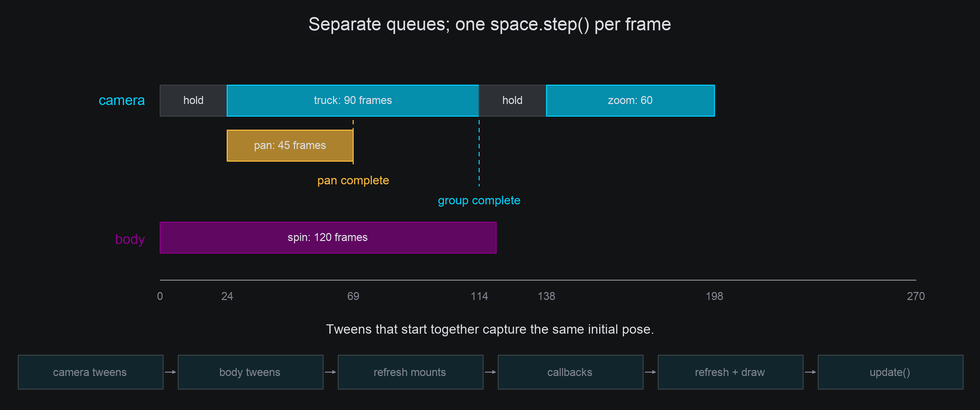
This shot gives the body a 120-frame turn, while the camera waits, trucks for 90 frames and pans for 45 of them, then
zooms. on_complete belongs to the last individual tween, so the pan's callback fires while the truck is still
moving. on_group_complete waits for both. Both callbacks receive the camera and return None:
        self.subject.spin("y", turns=0.25, frames=120, ease=easing.in_out_sine)
        camera.hold(24).truck(10, frames=90, ease=easing.in_out_sine)
        camera.pan(5, frames=45, ease=easing.in_out_sine, together=True).on_complete(self.pan_done)
        camera.on_group_complete(self.group_done)
        camera.hold(24).zoom_to(150, frames=60, ease=easing.in_out_sine).hold(24)
tte --input-file concept_input.txt --canvas-width 80 --canvas-height 32 --anchor-text c cameralab --lesson sequence

In each frame, update() steps the world first: camera tweens, then each body's tweens and path, then the callbacks of
everything that finished, camera first. Then every character whose place changed is projected again, the active
characters tick, and the drawn bodies are painted. A completion callback can therefore read final readings, or start
the hand-off at the final view.
Immediate calls, zero frames and deltas
set_position, move_by, dolly, set_rotation and zoom apply now. Pan, tilt, roll, truck, pedestal, look_at
and orbit also apply now when frames is omitted. Supplying frames=0 makes them queued zero-frame actions: they
wait behind earlier groups rather than jumping ahead. Negative frame counts raise ValueError.
Camera tweens apply changes rather than overwrite the pose. For example, after a move tween has begun, an immediate
move_by(y=2) adds an offset that the remaining tween preserves. Local travel captures its direction at the start;
turns continue to compose with immediate turns; zoom changes multiply, so an immediate zoom(2) doubles the remaining
zoom trajectory. With concurrent edits, the final pose includes those edits and may differ from the original absolute
target.
Tracking a moving body
Immediate target movement is simple: move the body, then
call camera.look_at(body). A body that moves by tween or path moves inside update(), after camera tweens, so aiming
in __next__ sees where it was last frame. To follow the current frame's position, aim from a one-frame camera hook,
whose callback runs after every body has moved:
from terminaltexteffects.engine.camera import Camera


# A method on the effect iterator:
def aim_after_motion(self, camera: Camera) -> None:
    camera.look_at(self.target)


# In __next__, while the target is moving:
self.world.camera.hold(1).on_complete(self.aim_after_motion)
self.update()
Keep the camera queue free for those one-frame hooks; if a shot is already queued, the hook waits behind it. For a
fixed sampled aim, use one look_at(body, frames=...) instead.
Returning the view
camera.cancel() clears its tweens and pending callbacks but holds the current view. camera.reset() also restores the
camera's starting settings: position, orientation, focal length, projection, center, near plane and row scale, keeping
any perspective set with set_perspective. Reset is immediate; it does not accept frames. Neither resets bodies.
The text plane's characters land on their input cells only under the starting view. For an eased camera return, capture its readouts before changing it, then tween position, orientation and focal length together:
# Before changing the camera:
home_position = camera.position
home_rotation = camera.rotation
home_focal = camera.focal or camera.distance

# When returning, after other shot edits are finished:
camera.move_to(home_position, frames=90)
camera.turn_to(home_rotation, frames=90, together=True)
camera.zoom_to(home_focal, frames=90, together=True)
camera.on_group_complete(self.hand_off)  # The text is flat again.
If projection, row scale, optical center or near plane were also changed, restore those settings explicitly, or use
reset() when a cut is appropriate.
tte --input-file concept_input.txt --canvas-width 80 --canvas-height 32 --anchor-text c cameralab --lesson restore

The camera lab captures its starting view in setup_restore and leaves the text plane where it is. Its complete return
script is:
        if self.frame_number == 0:
            self.title = "START: the text plane stays fixed in world space"
        elif self.frame_number == 30:
            camera.truck(20, frames=120)
            self.title = "TRUCK: camera moves; the text layout is unchanged"
        elif self.frame_number == 90:
            camera.cancel()
            self.title = "CANCEL: stop here and keep the current view"
        elif self.frame_number == 120:
            camera.reset()
            self.title = "RESET: jump to the initial position, aim and focal length"
        elif self.frame_number == 180:
            camera.set_position(10, 6, 100).pan(6).zoom(1.15)
            self.title = "SMOOTH RETURN: position, orientation and focal together"
            camera.move_to(
                self.home_position.x, self.home_position.y, self.home_position.z, frames=90, ease=easing.in_out_sine
            )
            camera.turn_to(self.home_rotation, frames=90, ease=easing.in_out_sine, together=True)
            camera.zoom_to(self.home_focal, frames=90, ease=easing.in_out_sine, together=True)
            camera.on_group_complete(self.release_home)
Under the hood
A tween is a function of progress from 0 to 1. Each frame, the world advances the front of the camera's queue and
each body's queue by one frame, eases the progress, and applies the change since the last frame. That's why tweens
compose: each applies a difference, not an absolute pose. settle and turn_to use Rotation.slerp to find the
orientation at each step.
At cell resolution
-
Easing matters more in cells than in pixels. A linear spin starts and stops with a visible jolt, and an eased one doesn't. The Eases example gives three cubes the same quarter turns with different easing functions:

turn_to,turn_to_rest,settleandscale_totake the sameeaseargument as paths. The example's source isdocs/effectguide/examples/3d/eases/eases.pyin a TTE checkout. - Hold a moment at rest before handing text back, so the reader sees it land.