Transforms
A body's transform, or pose, is where it is, which way it faces and how big it is. Every point of its shape and every node attached to it is placed by applying that transform. Three operations make it up, and the order you apply them in changes the result.
The idea
- Scale grows or shrinks the body about its own origin.
- Rotate turns it about an axis through its own origin.
- Move shifts it to a position in its parent's frame.
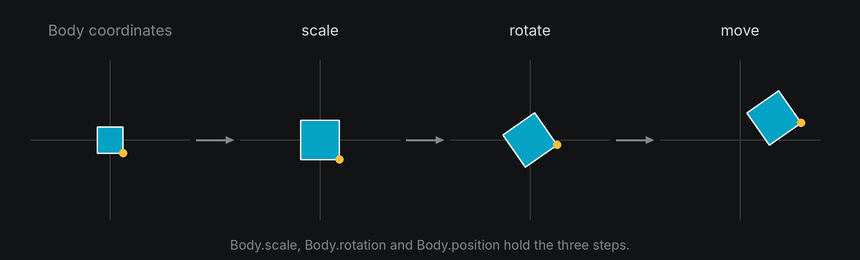

A body applies them in that order: scale, then rotate, then move. Because the turn happens before the move, the body always turns about its own center, wherever it is. That's spinning in place.
Do it the other way around, moving first and turning second, and the turn swings the body around the world's origin. That's an orbit. A spinning planet and a moon going around it are the same turn applied in different orders.
In TTE

The Orbit example turns a planet and a moon by the same angle each frame. The planet stays at the origin and only its orientation changes. The moon's starting position is turned too, so it travels around the planet. Each frame:
turn = rotation_about("y", 360 * self.frame_number / self.config.frames)
self.planet.rotation = self.tilt * turn  # Spin in place.
self.moon.rotation = self.tilt * turn
self.moon.position = (self.tilt * turn).apply(self.moon_start)  # Orbit: turn the moon's offset, then move there.
orbit.py
Save it in your community effects directory as orbit.py.
"""Orbit: a planet turns in place while a moon orbits it.

An Effect Guide example for the Transforms chapter. Both bodies turn by the same angle each frame. The planet
turns about its own center. The moon's position is turned about the world origin, so it travels around the planet.
"""

from __future__ import annotations

from dataclasses import dataclass

from terminaltexteffects import Shaded, Vec3, rotation_about
from terminaltexteffects.engine.base_config import BaseConfig
from terminaltexteffects.engine.base_effect import BaseEffect, BaseEffectIterator
from terminaltexteffects.engine.shapes import Cube
from terminaltexteffects.utils import argutils


def get_effect_resources() -> tuple[str, type[BaseEffect], type[BaseConfig]]:
    """Return the command name, effect class, and configuration class TTE registers."""
    return "orbit", Orbit, OrbitConfig


@dataclass
class OrbitConfig(BaseConfig):
    """Configuration for the Orbit effect."""

    parser_spec = argutils.ParserSpec(
        name="orbit",
        help="A planet turns in place while a moon orbits it.",
        description="orbit | A planet turns in place while a moon orbits it.",
        epilog="Example: tte --canvas-width 80 --canvas-height 24 --anchor-text c orbit",
    )
    frames: int = argutils.ArgSpec(
        name="--frames",
        type=argutils.PositiveInt.type_parser,
        default=360,
        metavar=argutils.PositiveInt.METAVAR,
        help="Frames for one full orbit.",
    )  # pyright: ignore[reportAssignmentType]
    "int : Frames for one full orbit."


class OrbitIterator(BaseEffectIterator[OrbitConfig]):
    """Produce the frames of the Orbit effect."""

    def __init__(self, effect: Orbit) -> None:
        """Place the planet at the origin and the moon to its right."""
        super().__init__(effect)
        self.world = self.terminal.world
        self.planet = self.world.body(Cube(16)).draw(Shaded())
        self.moon = self.world.body(Cube(6)).draw(Shaded())
        self.moon_start = Vec3(30, 0, 0)  # Where the moon starts, relative to the origin.
        self.tilt = rotation_about("x", 20)  # Tip the top toward the viewer, so we look down on the orbit.
        self.frame_number = 0
        self.text_shown = False

    def __next__(self) -> str:
        """Turn both bodies one step, then swap them for the text after one orbit."""
        if self.frame_number <= self.config.frames:
            turn = rotation_about("y", 360 * self.frame_number / self.config.frames)
            # Spin in place: only the planet's orientation changes. Its position stays at the origin.
            self.planet.rotation = self.tilt * turn
            # Orbit: the moon's position is turned about the origin, then the moon is moved there.
            self.moon.rotation = self.tilt * turn
            self.moon.position = (self.tilt * turn).apply(self.moon_start)
            self.frame_number += 1
        elif not self.text_shown:
            for body in (self.planet, self.moon):
                body.erase()  # The world hides its cells when it next paints.
            for character in self.terminal.get_characters():
                self.terminal.set_character_visibility(character, is_visible=True)
            self.text_shown = True
        else:
            raise StopIteration
        self.update()
        return self.frame


class Orbit(BaseEffect[OrbitConfig]):
    """A planet turns in place while a moon orbits it."""

    @property
    def _config_cls(self) -> type[OrbitConfig]:
        return OrbitConfig

    @property
    def _iterator_cls(self) -> type[OrbitIterator]:
        return OrbitIterator
Each part of the transform can be set now or changed over frames:
| Part | Now | Over frames |
|---|---|---|
| Rotation | rotate(axis, degrees), or set body.rotation |
spin, settle, turn_to, turn_to_rest |
| Position | Set body.position |
A path on body.motion, like a character's |
| Scale | Set body.scale |
scale_to(scale, frames) |
reset() puts all three back to how the body was created and cancels its queued tweens. The properties read the
current values, and the methods return the body, so calls chain: cube.rotate("x", 20).spin("y").
The order you change these in doesn't change that pipeline. A body always scales, then turns about its own origin,
then moves, so setting position = (30, 0, 0) and then calling rotate("y", 45) still spins the body in place at
x = 30; it doesn't swing it around the world's origin. To orbit, either turn the moon's starting offset yourself, as
the example does, or let a parent do it: attach the moon to a pivot at the planet's center and turn the pivot. The
pivot turns first and the moon's offset swings round with it, which is moving and then turning (see
The world).
The camera orbit is a different operation: it leaves these body transforms fixed and moves the viewpoint around the scene.
Under the hood
geometry3d.transform_points applies a transform to many points at once:
from terminaltexteffects import Rotation, Vec3
from terminaltexteffects.utils.geometry3d import transform_points

world = transform_points(points, Rotation.about_y(angle), scale=2.0, position=Vec3(10, 0, 0))
It scales each point, rotates it with the rotation's matrix and adds the position. body.to_world(point, surface=False) does the
same for one point, with the body's pose and every parent's (see Frames and coordinates).
At cell resolution
- Moving a body by less than a cell often changes nothing on screen. Slow drifts look stepped, so ease them or combine them with a turn.
- Scaling changes how many cells a shape covers. A shape scaled below about 6 columns stops reading as a shape at all (see 3D in a terminal).
- Positions scale with the body, but characters don't. A text plane scaled to half size crowds two characters into each cell, and only one of them can show.