Meshes
Every shape is a mesh: a list of corner points and the flat faces between them. The built-in shapes build their meshes for you. Knowing what's inside one lets you pick shapes that read well, and build your own when none fits.
The idea
- Vertices are the corner points, in the shape's own coordinates, centered on its origin.
- Faces are flat polygons, each listing the vertices at its corners.
- Edges are where two faces meet. A wireframe draws them.
- Each face has a normal: an arrow pointing straight out of it. Normals decide which faces turn toward the camera and how brightly each face is lit.
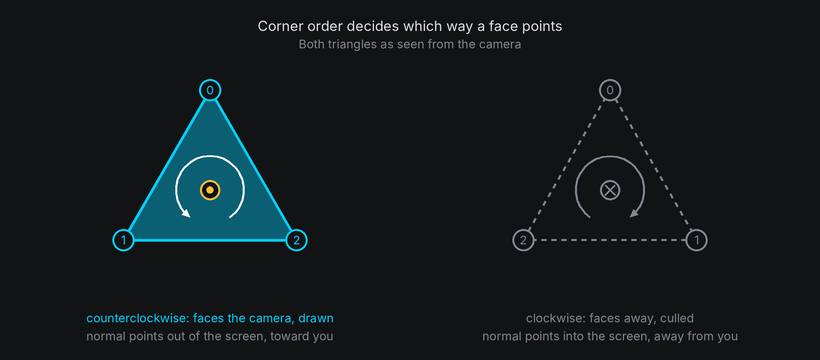
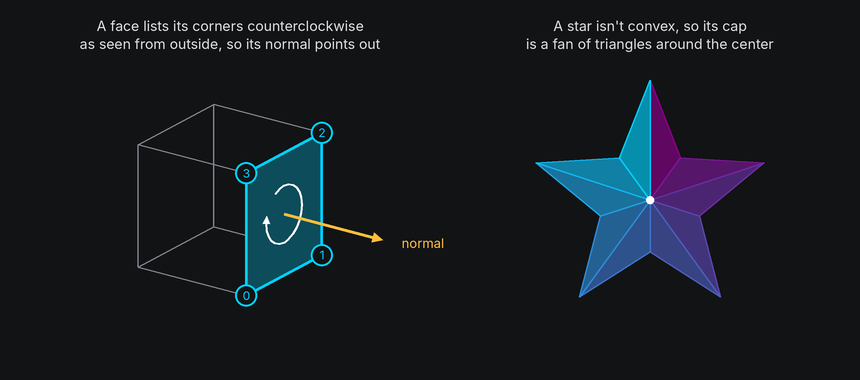
The order a face lists its corners in sets which way its normal points. Listed counterclockwise as seen from outside, the normal points out of the shape. List them the other way and the face is inside out: it's culled when it should show, and shows when it should be hidden.
Faces must be convex: no corner may point inward. A shape with inward corners, such as a star, splits each such face into triangles, which are always convex.
Curved shapes are meshes too. A sphere is a band of flat faces, and more segments and rings make its outline
rounder at a higher cost per frame.
Shape ownership
A body's shape is read-only: its mesh, surface and texture layouts are built from that shape when
world.body(shape) is called. Create another body to use a different shape, and attach the characters to it.
In TTE

The Gallery example shows every built-in shape, a few at a time so each is large enough to read. Each shape is one body:
body = self.world.body(shape, at=(x, 0, 0)).draw(self.look)  # shape is Cube(...), Torus(...) and so on.
body.rotate("x", 25)
body.spin("y", turns=1, frames=180, ease=easing.in_out_sine)
gallery.py
Save it in your community effects directory as gallery.py.
"""Gallery: every built-in shape, a few at a time.

An Effect Guide example for the Meshes chapter.
"""

from __future__ import annotations

from dataclasses import dataclass

from terminaltexteffects import Color, ColorPair, EffectCharacter, Shaded, Wireframe, easing
from terminaltexteffects.engine.base_config import BaseConfig
from terminaltexteffects.engine.base_effect import BaseEffect, BaseEffectIterator
from terminaltexteffects.engine.shapes import (
    Box,
    Cube,
    Cylinder,
    Icosahedron,
    Octahedron,
    Prism,
    Pyramid,
    Shape,
    Sphere,
    Tetrahedron,
    Torus,
)
from terminaltexteffects.utils import argutils
from terminaltexteffects.utils.geometry import Coord


def get_effect_resources() -> tuple[str, type[BaseEffect], type[BaseConfig]]:
    """Return the command name, effect class, and configuration class TTE registers."""
    return "gallery", Gallery, GalleryConfig


@dataclass
class GalleryConfig(BaseConfig):
    """Configuration for the Gallery effect."""

    parser_spec = argutils.ParserSpec(
        name="gallery",
        help="Every built-in shape, a few at a time.",
        description="gallery | Every built-in shape, a few at a time.",
        epilog="Example: tte --canvas-width 80 --canvas-height 24 --anchor-text c gallery --wireframe",
    )
    wireframe: bool = argutils.ArgSpec(
        name="--wireframe",
        default=False,
        action="store_true",
        help="Draw only the edges of the shapes.",
    )  # pyright: ignore[reportAssignmentType]
    "bool : Draw only the edges of the shapes."


PAGES = (
    (("Cube", Cube(18)), ("Box", Box(24, 12, 12)), ("Prism", Prism(sides=6, radius=11, height=16))),
    (
        ("Pyramid", Pyramid(sides=4, radius=12, height=18)),
        ("Tetrahedron", Tetrahedron(13)),
        ("Octahedron", Octahedron(13)),
    ),
    (("Icosahedron", Icosahedron(13)), ("Cylinder", Cylinder(radius=11, height=16))),
    (("Sphere", Sphere(13)), ("Torus", Torus(major_radius=10, minor_radius=4))),
)
"""The shapes and their names, a few at a time, so each is large enough to read as a shape on an 80 by 24 canvas."""


class GalleryIterator(BaseEffectIterator[GalleryConfig]):
    """Produce the frames of the Gallery effect."""

    def __init__(self, effect: Gallery) -> None:
        """Show the first page of shapes."""
        super().__init__(effect)
        self.world = self.terminal.world
        self.world.camera.set_perspective(0.5)
        self.look = Wireframe() if self.config.wireframe else Shaded()
        self.labels: list[EffectCharacter] = []
        self.pages = iter(PAGES)
        self.show_page(next(self.pages))
        self.text_shown = False

    def show_page(self, shapes: tuple[tuple[str, Shape], ...]) -> None:
        """Remove the shapes on screen and spin the next few, side by side, each named underneath."""
        for body in self.world.bodies:
            self.world.remove(body)  # Its cells are hidden when the world next paints.
        self.clear_labels()
        spacing = 27 if len(shapes) == 3 else 34
        for index, (name, shape) in enumerate(shapes):
            x = (index - (len(shapes) - 1) / 2) * spacing
            body = self.world.body(shape, at=(x, 0, 0)).draw(self.look)
            body.rotate("x", 25)
            body.spin("y", turns=1, frames=180, ease=easing.in_out_sine)
            self.label(name, self.terminal.canvas.center.column + round(x))

    def label(self, text: str, column: int) -> None:
        """Write `text` on the bottom row, centered on `column`. Labels are plain characters on the text plane."""
        start = column - len(text) // 2
        for offset, symbol in enumerate(text):
            character = self.terminal.add_character(symbol, Coord(start + offset, self.terminal.canvas.bottom))
            character.animation.set_appearance(symbol, ColorPair(fg=Color("#a0a0a0")))
            self.terminal.set_character_visibility(character, is_visible=True)
            self.labels.append(character)

    def clear_labels(self) -> None:
        """Hide the labels of the last page."""
        for character in self.labels:
            self.terminal.set_character_visibility(character, is_visible=False)
        self.labels.clear()

    def __next__(self) -> str:
        """Spin each page of shapes in turn, then swap them for the text."""
        if not self.world.animating:
            page = next(self.pages, None)
            if page is not None:
                self.show_page(page)
            elif self.text_shown:
                raise StopIteration
            else:
                for body in self.world.bodies:
                    self.world.remove(body)
                self.clear_labels()
                for character in self.terminal.get_characters():
                    self.terminal.set_character_visibility(character, is_visible=True)
                self.text_shown = True
        self.update()
        return self.frame


class Gallery(BaseEffect[GalleryConfig]):
    """Every built-in shape, a few at a time."""

    @property
    def _config_cls(self) -> type[GalleryConfig]:
        return GalleryConfig

    @property
    def _iterator_cls(self) -> type[GalleryIterator]:
        return GalleryIterator
| Shape | Sizes | Faces |
|---|---|---|
Cube(size), Box(width, height, depth) |
Edge lengths | "front", "right", "back", "left", "top", "bottom" |
Prism(sides, radius, height) |
radius is center to corner |
Sides 0 to sides - 1, "top", "bottom" |
Pyramid(sides, radius, height) |
Base radius and height | Sides 0 to sides - 1, "bottom" |
Cylinder(radius, height, segments) |
segments around |
"side", "top", "bottom" |
Tetrahedron, Octahedron, Icosahedron |
radius to each corner |
|
Sphere(radius, segments, rings) |
segments around, rings top to bottom |
|
Torus(major_radius, minor_radius, segments, sides) |
Ring radius and tube radius |
The faces are the ones the body's surface names, so one name means one face whether you lay text
out on it or draw it: body.draw(Shaded(), faces={"front": Textured("1")}) gives the front of a cube its own look
(see the die recipe). Underneath, the mesh tags each face with a number in the same order, so a
cube's "front" is tag 0 and its "bottom" tag 5; shape.face_tags() lists them. Shapes without named faces, such
as the icosahedron, take mesh tags in faces instead.
The Star example builds its own shape. A custom shape subclasses Shape, like the built-in ones a frozen dataclass, and returns
a mesh from build_mesh. Once defined, it's used like any other shape:
star = self.world.body(StarPrism()).draw(Shaded())
star.rotate("x", -70)  # Stand the star up, with a cap facing the viewer.
star.py
Save it in your community effects directory as star.py.
"""Star: a custom star-shaped prism, built from its own mesh.

An Effect Guide example for the Meshes chapter.
"""

from __future__ import annotations

import math
from dataclasses import dataclass

from terminaltexteffects import Shaded, Vec3, Wireframe, easing
from terminaltexteffects.engine.base_config import BaseConfig
from terminaltexteffects.engine.base_effect import BaseEffect, BaseEffectIterator
from terminaltexteffects.engine.shapes import Shape
from terminaltexteffects.utils import argutils
from terminaltexteffects.utils.geometry3d import Face, Mesh


def get_effect_resources() -> tuple[str, type[BaseEffect], type[BaseConfig]]:
    """Return the command name, effect class, and configuration class TTE registers."""
    return "star", Star, StarConfig


@dataclass(frozen=True)
class StarPrism(Shape):
    """A star with `points` points, extruded `height` columns along the y axis."""

    points: int = 5
    outer: float = 16.0
    inner: float = 7.0
    height: float = 8.0

    def build_mesh(self) -> Mesh:
        """Return the star's mesh: one ring of corners at each end, joined by sides and capped."""
        corners = 2 * self.points
        ring = []
        for index in range(corners):
            # Corners alternate between the tips and the notches, going counterclockwise seen from above.
            radius = self.outer if index % 2 == 0 else self.inner
            angle = 2 * math.pi * index / corners
            ring.append((radius * math.sin(angle), radius * math.cos(angle)))
        half = self.height / 2
        bottom = [Vec3(x, -half, z) for x, z in ring]
        top = [Vec3(x, half, z) for x, z in ring]
        vertices = (*bottom, *top, Vec3(0, -half, 0), Vec3(0, half, 0))
        bottom_center, top_center = 2 * corners, 2 * corners + 1

        faces = []
        for index in range(corners):
            following = (index + 1) % corners
            # Each side is a rectangle. Listed counterclockwise seen from outside, its normal points out.
            faces.append(Face((index, following, corners + following, corners + index), tag=index))
        for index in range(corners):
            following = (index + 1) % corners
            # A star isn't convex, so each cap is a fan of triangles around its center.
            faces.append(Face((top_center, corners + index, corners + following), tag=corners))
            faces.append(Face((bottom_center, following, index), tag=corners + 1))
        return Mesh(vertices, tuple(faces))


@dataclass
class StarConfig(BaseConfig):
    """Configuration for the Star effect."""

    parser_spec = argutils.ParserSpec(
        name="star",
        help="A custom star-shaped prism, built from its own mesh.",
        description="star | A custom star-shaped prism, built from its own mesh.",
        epilog="Example: tte --canvas-width 80 --canvas-height 24 --anchor-text c star --wireframe",
    )
    wireframe: bool = argutils.ArgSpec(
        name="--wireframe",
        default=False,
        action="store_true",
        help="Draw only the edges, which shows how the caps are split into triangles.",
    )  # pyright: ignore[reportAssignmentType]
    "bool : Draw only the edges, which shows how the caps are split into triangles."


class StarIterator(BaseEffectIterator[StarConfig]):
    """Produce the frames of the Star effect."""

    def __init__(self, effect: Star) -> None:
        """Stand the star up facing the viewer, and tumble it."""
        super().__init__(effect)
        self.world = self.terminal.world
        star = self.world.body(StarPrism()).draw(Wireframe() if self.config.wireframe else Shaded())
        star.rotate("x", -70)  # Stand the star up, with a cap facing the viewer and a point at the top.
        star.spin("y", turns=1, frames=360, ease=easing.in_out_sine)
        star.spin("x", turns=0.5, frames=360, ease=easing.in_out_sine, together=True)
        self.text_shown = False

    def __next__(self) -> str:
        """Tumble the star, then swap it for the text."""
        if not self.world.animating:
            if self.text_shown:
                raise StopIteration
            for body in self.world.bodies:
                body.erase()  # The world hides its cells when it next paints.
            for character in self.terminal.get_characters():
                self.terminal.set_character_visibility(character, is_visible=True)
            self.text_shown = True
        self.update()
        return self.frame


class Star(BaseEffect[StarConfig]):
    """A custom star-shaped prism, built from its own mesh."""

    @property
    def _config_cls(self) -> type[StarConfig]:
        return StarConfig

    @property
    def _iterator_cls(self) -> type[StarIterator]:
        return StarIterator


StarPrism.build_mesh places a ring of corners at each end, alternating between the points and the notches. Each
side is a rectangle between the rings. Each cap is a fan of triangles around a center vertex, because the star's
outline isn't convex.
Under the hood
geometry3d.Mesh holds vertices (Vec3s) and faces (Faces). A Face
has indices into the vertices, optional uvs for texture mapping, and a tag. The mesh works out
each face's normal from its corner order when it's created, and edges() lists each edge once.
The builders, such as g3.box, g3.prism and g3.uv_sphere, return meshes, and mesh.scaled(x, y, z) stretches
one. A Shape adds what a body needs on top of its mesh: build_surface for the grid characters sit on and
texture_cell for Textured looks.
A mesh is only for drawing. Characters sit on the body's surface, a grid built by build_surface, which is a
separate thing from the mesh's faces (see Surfaces). A custom shape like StarPrism doesn't define
build_surface, so its body has no surface: it can be drawn, and characters can be attached to it with (x, y, z)
positions in its axes, as on a pivot.
At cell resolution
- More faces cost more time but don't always look better. Past the point where each face covers only a few cells, extra detail is lost at cell resolution.
- Thin parts, like a torus's tube seen edge-on, can fall between cell centers. Keep every part a few cells thick.
- Flat faces show as flat patches of one symbol. That's what makes a cube read as a cube, and why a low-detail sphere looks faceted.
Dimension contracts
Use positive dimensions for built-in shapes and mesh factories. They intentionally do not check dimension signs: zero can collapse faces, and negative sizes can reverse winding and normals. Shading and texture layouts for those sizes are not guaranteed. Body scale is a separate transform and explicitly rejects non-positive values. Custom mesh faces should be flat, convex, and wound outward.