Tall Cells
Terminal cells are not square. A typical cell is about twice as tall as it is wide, so a shape drawn with one cell per unit in both directions comes out twice as tall as it should. TTE corrects for this in the camera, so you can work in plain columns and still get round spheres and square cubes.
The idea
Measured in pixels, a row is roughly two columns tall. If a 16 unit cube were drawn 16 columns wide and 16 rows tall, it would look like a tower. To look like a cube on screen, it must be 16 columns wide and about 8 rows tall.
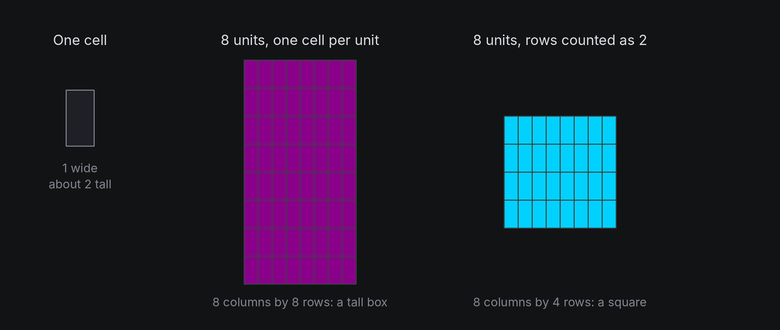
The camera does this by counting each row as row_scale units of height, 2 by default
(geometry.TERMINAL_ROW_SCALE). Everything above the camera works in columns, as if cells were square. Only the
final step, from world space to canvas rows, divides heights by 2.
In TTE
The Cells example turns two bodies side by side. On the left is a 16 unit cube. On the right is a box twice as tall, 16 by 32 by 16, which is how the cube would look if the camera counted each row as one unit:
self.world.body(Cube(16), at=(-20, 0, 0)).draw(Shaded())
self.world.body(Box(16, 32, 16), at=(20, 0, 0)).draw(Shaded())
cells.py
Save it in your community effects directory as cells.py.
"""Cells: the same cube drawn with and without the tall-cell correction.

An Effect Guide example for the Tall Cells chapter.
"""

from __future__ import annotations

from dataclasses import dataclass

from terminaltexteffects import Shaded, easing
from terminaltexteffects.engine.base_config import BaseConfig
from terminaltexteffects.engine.base_effect import BaseEffect, BaseEffectIterator
from terminaltexteffects.engine.shapes import Box, Cube
from terminaltexteffects.utils import argutils


def get_effect_resources() -> tuple[str, type[BaseEffect], type[BaseConfig]]:
    """Return the command name, effect class, and configuration class TTE registers."""
    return "cells", Cells, CellsConfig


@dataclass
class CellsConfig(BaseConfig):
    """Configuration for the Cells effect."""

    parser_spec = argutils.ParserSpec(
        name="cells",
        help="The same cube drawn with and without the tall-cell correction.",
        description="cells | The same cube drawn with and without the tall-cell correction.",
        epilog="Example: tte --canvas-width 80 --canvas-height 24 --anchor-text c cells",
    )


class CellsIterator(BaseEffectIterator[CellsConfig]):
    """Produce the frames of the Cells effect."""

    def __init__(self, effect: Cells) -> None:
        """Turn a cube beside a box twice its height: how the cube would look if rows counted as one unit."""
        super().__init__(effect)
        self.world = self.terminal.world
        # The camera counts a row as two units tall, so the cube on the left is square on screen. Treating rows
        # as one unit would draw everything twice as tall, like the box on the right.
        self.bodies = (
            self.world.body(Cube(16), at=(-20, 0, 0)).draw(Shaded()),
            self.world.body(Box(16, 32, 16), at=(20, 0, 0)).draw(Shaded()),
        )
        for body in self.bodies:
            body.rotate("x", 20)
            body.spin("y", turns=1, frames=300, ease=easing.in_out_sine)
        self.text_shown = False

    def __next__(self) -> str:
        """Turn the bodies, then swap them for the text."""
        if not self.world.animating:
            if self.text_shown:
                raise StopIteration
            for body in self.bodies:
                body.erase()  # The world hides its cells when it next paints.
            for character in self.terminal.get_characters():
                self.terminal.set_character_visibility(character, is_visible=True)
            self.text_shown = True
        self.update()
        return self.frame


class Cells(BaseEffect[CellsConfig]):
    """The same cube drawn with and without the tall-cell correction."""

    @property
    def _config_cls(self) -> type[CellsConfig]:
        return CellsConfig

    @property
    def _iterator_cls(self) -> type[CellsIterator]:
        return CellsIterator

A world has one camera, so the example shows the uncorrected cube as a box built twice as tall. Setting
world.camera.row_scale = 1 would draw the whole scene that way. You never need it in a real effect.
Under the hood
Camera has a row_scale field. project divides the y offset by it, and
cell_to_world multiplies by it, so the two stay exact inverses:
Line symbols for wireframes use the same scale. geometry3d.line_symbol multiplies the row change by row_scale
before measuring an edge's angle, so a 45 degree edge on screen is drawn with / and not |.
At cell resolution
- Vertical detail is half as fine as horizontal detail. A sphere 16 columns wide is only 8 rows tall, so its top and bottom edges are coarse. Wider shapes hide this best.
- In the default view, moving a body on the z = 0 plane by 1 unit in y moves it half a row, so slow vertical motion steps once every two units. Nearer or farther away, perspective scales that, and a turned camera changes it again. Horizontal motion steps every unit and looks smoother.
- Turning doesn't favor either axis. Text on a face turning about x and text turning about y both shrink by the cosine of the angle, so at 60 degrees each shows half its rows or half its columns. The row correction already allowed for tall cells when the text was lifted into 3D.
- Fonts vary, so the real ratio is somewhere around 1.8 to 2.2. TTE uses 2 because it's close for common fonts.