Camera and Projection
A camera answers two questions: where are we looking from? and how does that view become terminal cells? Its position and orientation answer the first. Projection and focal length answer the second. Start here for framing and perspective, then read Moving the camera for travel, turning, aiming and orbiting.
The default view
Every world has one camera, terminal.world.camera. It starts with its eye at (0, 0, 120), looking along world
-z, with +y up. The canvas center is the center of the image. This is the view used by the earlier chapters;
moving the camera changes the view while the world axes and body positions stay fixed.

- Perspective makes farther things smaller. A point's projected size is multiplied by
focal / depth, where depth is distance along the camera's forward axis. Initially focal length is 120 too, so the world z=0 plane keeps its size and the input text meets its original cells. - Orthographic projection skips that multiplication. Depth still exists for clipping and occlusion; it just does not change apparent size. The eye has a finite position and a near plane even though its rays are parallel.
Once the camera moves or turns, the world z=0 plane is no longer necessarily face-on, centered or at its initial size. Camera coordinates and depth explains the extra transform.
Setting up perspective
camera.set_perspective(strength) chooses the projection, now:
| Strength | Eye z | Focal length | Result |
|---|---|---|---|
0 |
120 | Ignored for size | Orthographic, with no depth magnification |
1 |
120 | 120 | Default perspective |
2 |
60 | 60 | Closer eye and stronger differences between near and far objects |
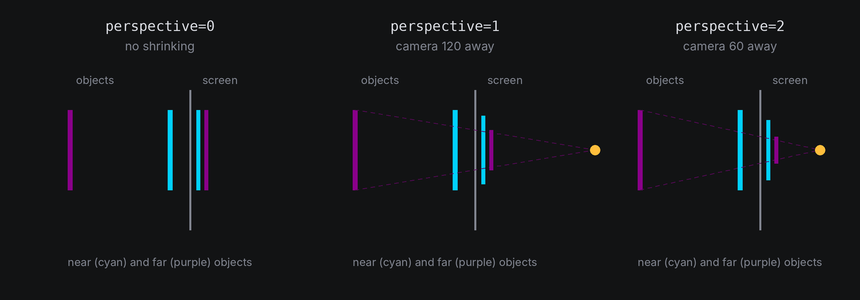
The Lens example keeps the bodies still and changes only that initial setup:
self.world = self.terminal.world
self.world.camera.set_perspective(self.config.perspective)
for x, z in ((-26, 0), (0, -60), (26, -120)):
    self.world.body(Cube(14), at=(x, 0, z)).draw(Shaded())
lens.py
Save this module in your community effects directory as lens.py.
"""Lens: three cubes running away from the viewer, seen with a chosen perspective.

An Effect Guide example for the Camera and Projection chapter.
"""

from __future__ import annotations

from dataclasses import dataclass

from terminaltexteffects import Shaded, easing
from terminaltexteffects.engine.base_config import BaseConfig
from terminaltexteffects.engine.base_effect import BaseEffect, BaseEffectIterator
from terminaltexteffects.engine.shapes import Cube
from terminaltexteffects.utils import argutils


def get_effect_resources() -> tuple[str, type[BaseEffect], type[BaseConfig]]:
    """Return the command name, effect class, and configuration class TTE registers."""
    return "lens", Lens, LensConfig


@dataclass
class LensConfig(BaseConfig):
    """Configuration for the Lens effect."""

    parser_spec = argutils.ParserSpec(
        name="lens",
        help="Three cubes running away from the viewer.",
        description="lens | Three cubes running away from the viewer.",
        epilog="Example: tte --canvas-width 80 --canvas-height 24 --anchor-text c lens --perspective 2",
    )
    perspective: float = argutils.ArgSpec(
        name="--perspective",
        type=argutils.NonNegativeFloat.type_parser,
        default=1.0,
        metavar=argutils.NonNegativeFloat.METAVAR,
        help="1 is natural, larger values exaggerate depth, and 0 is a flat orthographic view.",
    )  # pyright: ignore[reportAssignmentType]
    "float : 1 is natural, larger values exaggerate depth, and 0 is a flat orthographic view."


class LensIterator(BaseEffectIterator[LensConfig]):
    """Produce the frames of the Lens effect."""

    def __init__(self, effect: Lens) -> None:
        """Place three cubes from near and left to far and right, and spin them."""
        super().__init__(effect)
        self.world = self.terminal.world
        self.world.camera.set_perspective(self.config.perspective)
        # Each cube is 26 columns right of and 60 columns farther away than the one before it.
        for x, z in ((-26, 0), (0, -60), (26, -120)):
            cube = self.world.body(Cube(14), at=(x, 0, z)).draw(Shaded())
            cube.rotate("x", 20)
            cube.spin("y", turns=1, frames=240, ease=easing.in_out_sine)
        self.text_shown = False

    def __next__(self) -> str:
        """Spin the cubes, then swap them for the text."""
        if not self.world.animating:
            if self.text_shown:
                raise StopIteration
            for body in self.world.bodies:
                body.erase()  # The world hides its cells when it next paints.
            for character in self.terminal.get_characters():
                self.terminal.set_character_visibility(character, is_visible=True)
            self.text_shown = True
        self.update()
        return self.frame


class Lens(BaseEffect[LensConfig]):
    """Three cubes running away from the viewer."""

    @property
    def _config_cls(self) -> type[LensConfig]:
        return LensConfig

    @property
    def _iterator_cls(self) -> type[LensIterator]:
        return LensIterator



set_perspective sets both the eye's reference distance, 120 / strength, and the focal length, so the z = 0 plane
keeps its size at any strength. It becomes the camera's starting setup: camera.reset() keeps it. Call it once, in
the iterator's __init__. The controls below let an effect change position and focal length independently
afterward.
Moving the camera
Moving the camera teaches eye position, camera-local travel, pan/tilt/roll, aiming and orbiting. Camera shots and timing combines those controls into queued shots. Start with the comparison below when deciding between changing position and changing focal length.
Dolly or zoom?
A dolly moves the eye forward or backward. The foreground grows faster than the background as you approach, and their relative positions can change: that is parallax. A zoom changes focal length while the eye stays still. It magnifies the whole perspective image, keeping its perspective proportions.
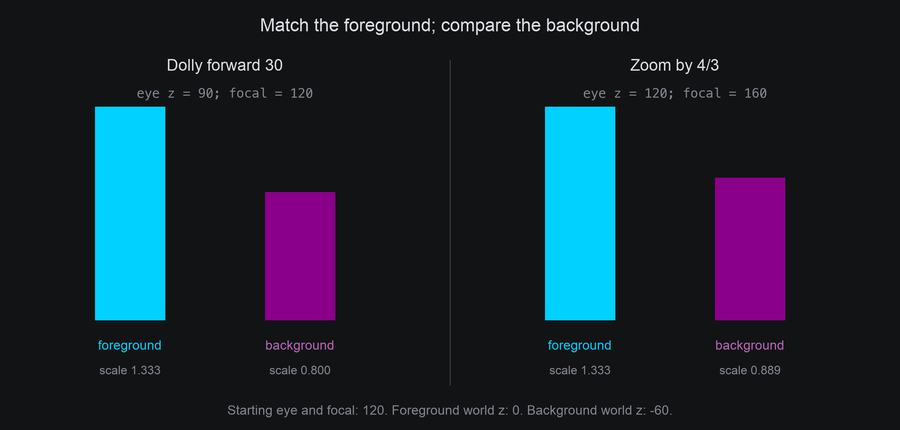


The camera lab starts with eye z=120 and focal=120. Cyan F has its front face at world z=0; purple B has its front face at z=-60. Both are the same physical size. These two moves give F the same final framing:
| Move | Final eye z | Final focal | F's front-face scale | B's front-face scale |
|---|---|---|---|---|
dolly_by(30) |
90 | 120 | 120 / 90 = 1.333 | 120 / 150 = 0.800 |
zoom_to(160) |
120 | 160 | 160 / 120 = 1.333 | 160 / 180 = 0.889 |
dolly(amount) and zoom(factor) are immediate. dolly_by(amount, frames=...) is relative travel;
zoom_to(focal, frames=...) targets an absolute positive focal length. For example, zoom(2) doubles the current
focal length, while zoom_to(2) targets a focal length of two columns. Choose dolly to travel through a scene and
zoom to reframe the image from the same viewpoint.
Orthographic camera movement
Orthographic travel and turns still work. Truck and pedestal move the image; pan, tilt and roll change which way you see the scene. Dolly changes depth and can cross the near plane, but does not magnify. Focal length is ignored, so zoom does not magnify either. Watch the readout change during the first two phases of this recording:
tte --input-file concept_input.txt --canvas-width 80 --canvas-height 32 --anchor-text c cameralab --lesson orthographic

The standalone camera lab and its lesson snippets are introduced in Moving the camera.
Camera coordinates and depth
Body coordinates describe points on a body. A body's transform places them in world space. The camera then subtracts its eye position and undoes its orientation to express those world points in view space. In that space, forward is always -z, right is +x and up is +y. Projection turns view x/y into canvas columns/rows.
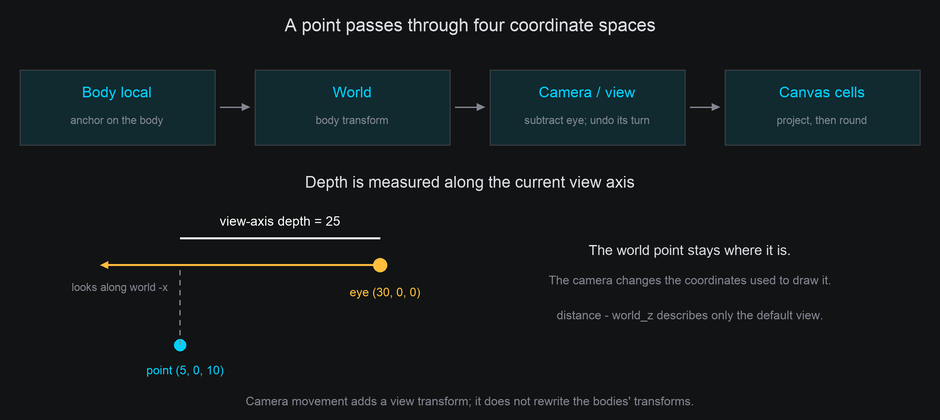
For a world point point, the geometry is equivalent to:
camera.depth(point), Projected.depth and character.view.depth all use this view-axis depth. It is not Euclidean range
to the eye. With the default orientation and position it equals camera.distance - point.z; after camera movement,
use depth(point) instead of assuming that formula still describes the view.
Projection returns None before the near plane, including behind the eye:
projected = self.world.camera.project(point)
if projected is not None:
    cell = projected.coord
    depth = projected.depth
The near plane is perpendicular to the current forward axis and moves with the eye. Faces and wireframe edges crossing it retain their visible portions. Depth and hidden surfaces shows this with a stationary body and a moving side-view camera.
Cells, rays and the text layout
camera.cell_to_world(coord, z=...) intersects the active viewing ray with a plane of constant world z.
For example, at the default view, z=0 lifts a cell onto the input-text plane. A moved or rolled camera uses a
different ray, so the resulting world x/y may change. If that ray is parallel to the plane, there is no unique
intersection and the method raises ValueError.
For an arbitrary camera view, a ray is often a better building block:
Perspective rays begin at the eye; orthographic rays begin at the cell's position on the eye plane. The direction is scaled so advancing by 30 gives a point at camera depth 30. It is not normalized to Euclidean length.
The text plane does not follow the camera. Its surface frame maps each canvas cell to the world point that cell
shows in the starting view, so the input text lands in its input cells only while the text plane is at its
starting pose and the camera is at its starting view. To bring the text home after moving the camera, put the
camera back with a tween or camera.reset(). Returning the view demonstrates it.
Settings and troubleshooting
| Symptom or task | Check |
|---|---|
| Everything disappears after moving the eye | Is the camera aimed at the scene? Movement alone does not turn it. Use look_at and check view-axis depth against near. |
| Objects enlarge when you wanted a flat view | Use camera.set_perspective(0); a long focal length alone is still perspective. |
| Text doubles or loses letters as the camera approaches | Projected characters are colliding or the textured surface is magnified. Use gentler framing or more canvas space. |
| Zoom appears to do nothing | Is the view orthographic? Its size ignores focal length. |
| Input text does not land home | Restore both the camera and the text plane; resetting only one does not restore the other. |
| You need a new optical center | center_column and center_row are canvas coordinates for the image center, not world positions. |

distance is the eye's reference distance: the eye follows it until an explicit set_position or travel call.
Afterward, changing it does not move the eye. With focal=None, it still supplies the focal length. zoom makes
focal length explicit. camera.reset() cancels the camera's tweens and restores its starting setup, including the
implicit position/focal relationship. position and rotation are read-only properties; change them through the
control methods.
set_perspective checks that the eye stays beyond the near plane. Direct field assignments, such as
camera.near = 2, are not checked. Keep projection values positive; a moved camera clips
using its current view depth rather than its distance from the world origin. row_scale remains the terminal's
tall-cell correction; see Tall cells.