Color
Module: terminaltexteffects.utils.graphics
Basic Usage
Color objects represent colors throughout TTE. They are immutable and hashable, so they can safely be reused as
dictionary keys and configuration values.
Supports Multiple Specification Formats
from terminaltexteffects.utils.graphics import Color

red = Color("ff0000")
xterm_red = Color(9)
rgb_red_again = Color("#FF0000")
RGB strings must contain exactly six hexadecimal digits and may have one leading #. They are normalized to lowercase
without the leading hash. XTerm colors must be non-boolean integers from 0 through 255. Invalid values raise
ValueError.
rgb_color exposes the normalized six-digit string, rgb_ints exposes its three integer channels, and xterm_color
contains the original XTerm index or None for an RGB specification.
Equality and Hashing
Equality preserves the normalized color specification, not only its displayed RGB value:
from terminaltexteffects.utils.graphics import Color

assert Color("#FF0000") == Color("ff0000")
assert Color(9) != Color("ff0000")
The second comparison is unequal even though XTerm color 9 converts to the same RGB value. Keeping XTerm provenance
distinct lets terminal output continue to choose between XTerm and RGB escape sequences.
Printing Colors
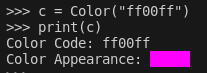
Colors can be printed to show the code and resulting color appearance.
Using Colors to Build a Gradient
from terminaltexteffects.utils.graphics import Color, Gradient

rgb = Gradient(Color("#ff0000"), Color("#00ff00"), Color("#0000ff"), steps=5)
for color in rgb:
    assert isinstance(color, Color)
    print(color.rgb_color)
Shifting Between Colors
shift_color_towards() accepts a factor from 0 through 1 and uses the same nearest, ties-to-even channel rounding
as gradient generation:
from terminaltexteffects.utils.graphics import Color, shift_color_towards

midpoint = shift_color_towards(Color("000000"), Color("ffffff"), 0.5)
assert midpoint == Color("808080")
An out-of-range or non-finite factor raises ValueError.
Passing Colors to Effect Configurations
from terminaltexteffects.effects.effect_colorshift import ColorShift
from terminaltexteffects.utils.graphics import Color

text = ("EXAMPLE" * 10 + "\n") * 10
red = Color("#ff0000")
green = Color("#00ff00")
blue = Color("#0000ff")
effect = ColorShift(text)
effect.effect_config.gradient_stops = (red, green, blue)
with effect.terminal_output() as terminal:
    for frame in effect:
        terminal.print(frame)
Color Reference
Represents a color in the RGB color space.
The color can be initialized with an XTerm-256 color code or an RGB hex color string. Can be printed to display the color code and appearance as a color block. RGB specifications are normalized to lowercase without a leading hash. Equality and hashing preserve the normalized specification: equivalent RGB spellings compare equal, while XTerm indices remain distinct from RGB specifications and from other indices. Instances are immutable.
Attributes:
| Name | Type | Description |
|---|---|---|
color_arg |
int | str
|
The color value as an XTerm-256 color code or an RGB hex color string. |
xterm_color |
int | None
|
The XTerm-256 color code. None if the color is an RGB hex color string. |
rgb_color |
str
|
The RGB hex color string. |
Properties
rgb_ints (tuple[int, int, int]): Returns the RGB values as a tuple of integers.
Raises:
| Type | Description |
|---|---|
ValueError
|
If the color value is not a valid XTerm-256 color code or an RGB hex color string. |
Source code in terminaltexteffects/utils/graphics.py
25 26 27 28 29 30 31 32 33 34 35 36 37 38 39 40 41 42 43 44 45 46 47 48 49 50 51 52 53 54 55 56 57 58 59 60 61 62 63 64 65 66 67 68 69 70 71 72 73 74 75 76 77 78 79 80 81 82 83 84 85 86 87 88 89 90 91 92 93 94 95 96 97 98 99 100 101 102 103 104 105 106 107 108 109 110 111 112 113 114 115 116 117 118 119 120 121 122 123 124 125 126 127 128 129 130 131 132 133 134 135 136 137 | |
rgb_ints
property
Returns the RGB values as a tuple of integers.
Returns:
| Type | Description |
|---|---|
tuple[int, int, int]
|
tuple[int, int, int]: The RGB values as a tuple of integers. |
__eq__(other)
Return whether this color has the same normalized specification as another Color.
Returns NotImplemented when other is not a Color.
Source code in terminaltexteffects/utils/graphics.py
__hash__()
__init__(color_value)
Initialize a Color object.
Parameters:
| Name | Type | Description | Default |
|---|---|---|---|
color_value
|
int | str
|
The color value as an XTerm-256 color code or an RGB hex color string. Example: 255 or 'ffffff' or '#ffffff' |
required |
Raises:
| Type | Description |
|---|---|
ValueError
|
If the color value is not a valid XTerm-256 color code or an RGB hex color string. |
Source code in terminaltexteffects/utils/graphics.py
__iter__()
__ne__(other)
Return whether this color is not equal to another Color.
Returns NotImplemented when other is not a Color.
Source code in terminaltexteffects/utils/graphics.py
__repr__()
__str__()
Return a string representation of the Color object.