Surfaces
A shaped body has a surface: a grid of cells laid over the shape, like the canvas laid over the text plane.
Characters attached to the body sit on that grid at (column, row, height), and their paths travel over it, round the
sides and over the edges, without your effect ever working out which face a character is on.
The idea
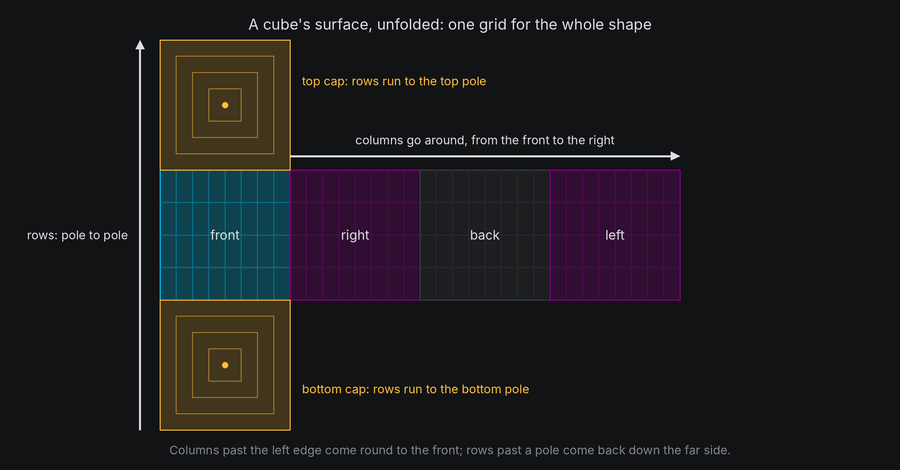
Every closed shape except the torus uses the same layout, like a map of a globe:
- Columns go around the shape, starting at the front and increasing to the right as seen from outside. A column is one unit wide, as on the canvas.
- Rows go from the bottom pole to the top pole: across the bottom cap from its center out to its edge, up the sides, then across the top cap from its edge in to its center. A row is two units tall, as on the canvas, and cells squeeze together toward the poles.
- Height is in units, outward from the surface. On a sphere that is straight out from the center. On flat faces it leans outward toward the edges, the same direction it has across the fold, so a character lifted off one face never jumps when it walks onto the next.
- Positions are normalized: column 70 on a surface 64 columns around is column 6, and a row past a pole comes back down the far side.
| Shape | Grid | Faces |
|---|---|---|
Cube, Box, Prism, Cylinder |
Columns around the sides, rows bottom cap to top cap | "front", "right", "back", "left", "top", "bottom" for boxes; 0 to n - 1, "top", "bottom" for prisms; "side", "top", "bottom" for cylinders |
Pyramid |
Columns around the sides, rows from the base's center to the apex | 0 to n - 1 for the sides, "bottom" |
Sphere |
Longitude and latitude | None |
Torus |
Columns around the ring, rows around the tube from the outside equator up over the top. Both wrap | None |
Plane |
An open grid, like the text plane: cells carry on past its edges | "front" |
Icosahedron, Octahedron and Tetrahedron have no surface yet. They can be drawn, and characters can be attached
to them with positions in their axes, as on a pivot.
In TTE
The Routes example lays the text out on the front of a box, walks it round the side, back again and up onto the lid, then sends every character the shortest way back to its place on the front. At the end, the text flies home to the text plane:
self.box.surface.face("front").layout_text(characters)
home = character.motion.position  # (column, row, height) on the box's surface.
around = character.motion.new_path(speed=0.5, ease=easing.in_out_sine, path_id="around")
around.walk(columns=50)
return_path = character.motion.new_path(speed=0.3, ease=easing.in_out_sine, path_id="return")
return_path.new_waypoint(home)
routes.py
Save it in your community effects directory as routes.py.
"""Routes: the text walks around a box, climbs onto its lid, takes the shortest way back, and flies home.

An Effect Guide example for the Surfaces chapter.
"""

from __future__ import annotations

from dataclasses import dataclass

from terminaltexteffects import EffectCharacter, EventHandler, easing
from terminaltexteffects.engine.base_config import BaseConfig
from terminaltexteffects.engine.base_effect import BaseEffect, BaseEffectIterator
from terminaltexteffects.engine.drawing import Shaded
from terminaltexteffects.engine.shapes import Box
from terminaltexteffects.engine.tweens import rotation_about
from terminaltexteffects.utils import argutils


def get_effect_resources() -> tuple[str, type[BaseEffect], type[BaseConfig]]:
    """Return the command name, effect class, and configuration class TTE registers."""
    return "routes", Routes, RoutesConfig


@dataclass
class RoutesConfig(BaseConfig):
    """Configuration for the Routes effect."""

    parser_spec = argutils.ParserSpec(
        name="routes",
        help="The text walks around a box, climbs onto its lid, and takes the shortest way back.",
        description="routes | The text walks around a box, climbs onto its lid, and takes the shortest way back.",
        epilog="Example: tte --canvas-width 80 --canvas-height 24 --anchor-text c routes",
    )


class RoutesIterator(BaseEffectIterator[RoutesConfig]):
    """Produce the frames of the Routes effect."""

    def __init__(self, effect: Routes) -> None:
        """Lay the text out on the box's front, and chain four moves over its surface."""
        super().__init__(effect)
        self.world = self.terminal.world
        self.world.set_light("upper left")
        self.box = self.world.body(Box(50, 20, 24), at=(0, -6, 10)).draw(Shaded())
        self.box.rotation = rotation_about("y", -20) * rotation_about("x", 30)

        characters = [c for c in self.terminal.get_characters() if c.input_symbol != " "]
        # Attach the text to the box's front face, laid out as the input reads.
        self.box.surface.face("front").layout_text(characters)
        for character in characters:
            self.terminal.set_character_visibility(character, is_visible=True)
            home = character.motion.position  # (column, row, height) on the box's surface.
            moves = character.motion
            # walk() goes straight ahead by an amount, over every edge it meets.
            around = moves.new_path(speed=0.5, ease=easing.in_out_sine, path_id="around")
            around.walk(columns=50)
            back = moves.new_path(speed=0.5, ease=easing.in_out_sine, path_id="back")
            back.walk(columns=-50)
            over = moves.new_path(speed=0.3, ease=easing.in_out_sine, path_id="over")
            over.walk(rows=12)
            # A waypoint on a closed surface is reached by the shortest straight route, over the edges between.
            return_path = moves.new_path(speed=0.3, ease=easing.in_out_sine, path_id="return")
            return_path.new_waypoint(home)
            handler = character.event_handler
            for finished, following in ((around, back), (back, over), (over, return_path)):
                handler.register_event(
                    EventHandler.Event.PATH_COMPLETE, finished, EventHandler.Action.ACTIVATE_PATH, following
                )
        self.characters: list[EffectCharacter] = characters
        self.delay = 40
        self.going_home = False

    def go_home(self) -> None:
        """Hand the text back: onto the text plane where it is, then along a path to its input cell."""
        for character in self.characters:
            character.attach(self.world.text_plane)
            home = character.motion.new_path(speed=0.8, ease=easing.in_out_cubic, path_id="home")
            home.new_waypoint(character.input_coord)
            character.motion.activate_path(home)
            self.active_characters.add(character)
        self.box.scale_to(0.05, frames=40, ease=easing.in_back)
        self.going_home = True

    def __next__(self) -> str:
        """Hold the text on the front for a moment, walk it until every move is done, then send it home."""
        if self.delay:
            self.delay -= 1
            if not self.delay:
                for character in self.characters:
                    character.motion.activate_path("around")
                    self.active_characters.add(character)
        elif not self.active_characters and not self.world.animating:
            if not self.going_home:
                self.go_home()
            elif self.box in self.world.bodies:
                self.world.remove(self.box)
            else:
                raise StopIteration
        self.update()
        return self.frame


class Routes(BaseEffect[RoutesConfig]):
    """The text walks around a box, climbs onto its lid, and takes the shortest way back."""

    @property
    def _config_cls(self) -> type[RoutesConfig]:
        return RoutesConfig

    @property
    def _iterator_cls(self) -> type[RoutesIterator]:
        return RoutesIterator

face("front").layout_text(characters)attaches the characters to the box and lays them out flat on the front face, as the input reads, centered.walk(columns=50)moves 50 columns to the right, straight ahead, over every edge on the way. The box's front is 50 columns wide, so each character ends up 50 columns along, round the corner on the right side or the back.walk(rows=12)climbs 12 rows. Past the top of the front face, the characters carry straight on over the edge and across the lid.new_waypoint(home)on a closed surface is reached by the shortest straight route: over the lid's edge and down the front, the way a string pulled tight across the box would lie.- All four paths are chained with
PATH_COMPLETEevents. Eachwalkstarts from wherever the previous path ended, because a route is worked out when its path is activated.
Faces
Faces let an effect place things without knowing the body's size. surface.face(name) returns a flat grid of its own,
seen from outside with text the right way up:
lid = cube.surface.face("top")
lid.width, lid.height  # Columns and rows in the face's grid.
lid.center  # The surface position of its middle cell.
lid.at(1, lid.top)  # Its top-left cell, as a surface position.
lid.random_coord()  # A random cell on it.
Cells on a face are numbered from 1, like the canvas: columns from left to right, rows from bottom to top. A
face that isn't a rectangle, such as a prism's lid or a pyramid's side, gets the smallest grid that covers it, and
contains(column, row) and row_extent(row) say which cells are on it.
Laying out text
| Call | Lays the characters out |
|---|---|
face.layout_text(characters) |
Flat on the face, as the input reads, centered |
surface.layout_text(characters) |
Around the surface, as the input reads, centered on surface.center: wrapped around a cylinder or sphere |
Both attach the characters and keep the input's rows and columns: the text is never scaled or reflowed. Text wider or
taller than the face carries on across the surface beyond it with overflow="extend", the default, the way walk()
goes. With overflow="clip", the characters that would go past the edge aren't attached; they are returned, so the
effect can hide them or send them elsewhere.
Travelling over a surface
On a surface, a waypoint and a walk mean different things:
| Call | Goes to | Route |
|---|---|---|
path.new_waypoint(position) |
A place: a surface position, a face cell or a target | The shortest straight route there, over any folds between |
path.walk(columns, rows) |
An amount, from wherever the path starts | Straight ahead by that much, over every fold and round as many laps as it takes |
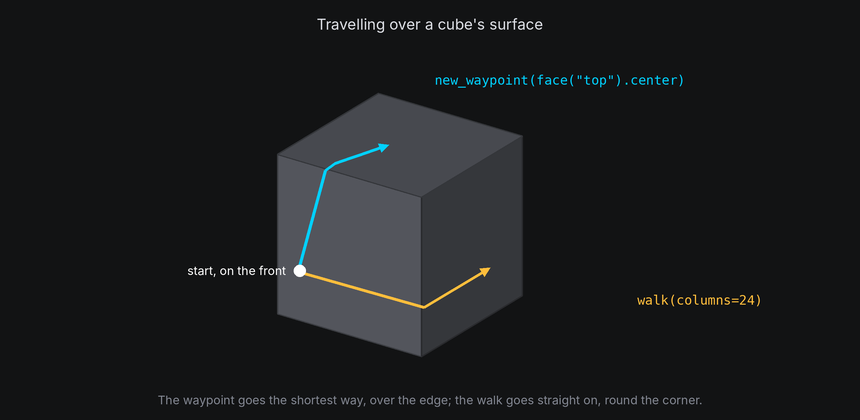
- On a box, the shortest route to the lid's center goes over the nearest edge. A walk of 64 columns on a 64-column cube goes once around and ends where it started.
- On a cylinder, a walk goes up the side as a helix and straight across a lid as a chord. On a sphere, it heads off along the grid and crosses the pole when the rows take it there.
- Where two routes are the same length, the tie goes up, then right, then down, then left.
- Routes are worked out once, when the path is activated, and cached by cell, so a thousand characters taking the same trip cost one route.
A plane's grid is open, so on a plane, or on the text plane, a waypoint is simply a straight line.
Positions and points
surface = cube.surface
position = surface.locate((0, 0, 8))  # The surface position at a point in the cube's own axes.
point, normal = surface.point(position)  # The point in the cube's axes, and the outward normal there.
where = surface.world_point(position)  # Where that position is in the world right now.
spot = surface.target(position)  # A live target that follows it (see Attaching and detaching).
surface.point, world_point and target take a column, row and height, or one position such as face.center.
surface.random_coord() is a random position spread evenly by area, not by cell, so the poles don't get more than
their share. surface.columns and surface.rows give the grid's size, and surface.closed is false only for a plane.
body.surface raises ValueError for a body without a surface. Check body.has_surface first when a body might be a
pivot.
At cell resolution
- A surface cell is a unit wide and two tall, like a terminal cell, but only when the face is square to the camera. A turned face squeezes its cells together, and two characters can land in the same screen cell.
- Near a pole, cells squeeze together on the surface itself. Text reads best on the sides, between the caps.
- Characters on the far side of a drawn body are hidden by its cells. On an undrawn body, they show through unless the
body has
hide_facing_awayset (see Depth).