Rotation
Turning is what makes 3D look like 3D, and it's the part with the most surprises. This chapter covers turning about one axis, combining turns into a tumble, and the two ways to bring a body back to rest.
The idea

A turn has an axis and an angle. The axis is a line through the body's origin. A positive angle turns counterclockwise when you look down the axis toward the origin:
- About y (up), the body turns like a revolving door.
- About x (right), it tips forward or back. A positive angle tips the top toward the default viewer, so you see it from above in that view.
- About z (toward the default viewer), it turns like a clock hand, counterclockwise.
Turns don't add up like numbers. Turning a cube -90 degrees about x, which carries its front face up onto the top, and then 90 degrees about y leaves it facing a different way than making the same two turns in the other order.
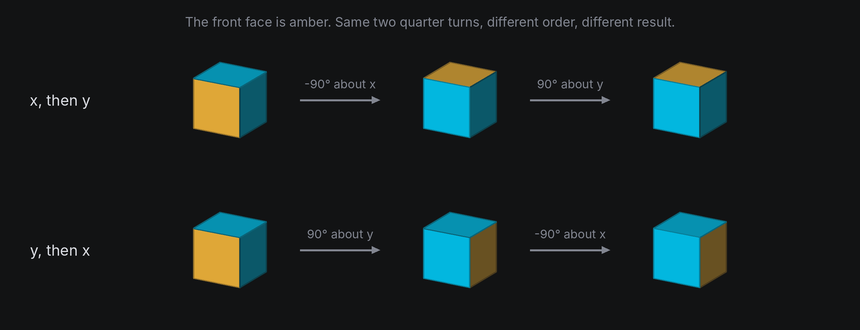
So TTE never stores an orientation as three angles, which would depend on the order you applied them in. It stores a quaternion: four numbers that describe the whole orientation as one turn about one axis. You never need to read them. What matters is what they make easy: combining turns, turning by part of a turn, and finding the shortest way from one orientation to another.
In TTE
The Turns example has three modes. In the first, each cube spins about one axis:
for axis, x in (("x", -26), ("y", 0), ("z", 26)):
    cube = self.world.body(Cube(14), at=(x, 0, 0)).draw(Shaded())
    cube.hold(30).spin(axis, turns=1, frames=240, ease=easing.in_out_sine).hold(30)
turns.py
Save it in your community effects directory as turns.py.
"""Turns: spins about each axis, a tumble, and two ways back to rest.

An Effect Guide example for the Rotation chapter.
"""

from __future__ import annotations

from dataclasses import dataclass

from terminaltexteffects import Color, ColorPair, EffectCharacter, Shaded, easing, rotation_about
from terminaltexteffects.engine.base_config import BaseConfig
from terminaltexteffects.engine.base_effect import BaseEffect, BaseEffectIterator
from terminaltexteffects.engine.shapes import Cube
from terminaltexteffects.utils import argutils
from terminaltexteffects.utils.geometry import Coord


def get_effect_resources() -> tuple[str, type[BaseEffect], type[BaseConfig]]:
    """Return the command name, effect class, and configuration class TTE registers."""
    return "turns", Turns, TurnsConfig


@dataclass
class TurnsConfig(BaseConfig):
    """Configuration for the Turns effect."""

    parser_spec = argutils.ParserSpec(
        name="turns",
        help="Spins about each axis, a tumble, and two ways back to rest.",
        description="turns | Spins about each axis, a tumble, and two ways back to rest.",
        epilog="Example: tte --canvas-width 80 --canvas-height 24 --anchor-text c turns --mode rest",
    )
    mode: str = argutils.ArgSpec(
        name="--mode",
        default="axes",
        choices=["axes", "tumble", "rest"],
        help="axes: one cube spins about each of x, y and z. tumble: two spins run together. rest: two cubes "
        "return to rest from the same pose, one with turn_to_rest and one with settle.",
    )  # pyright: ignore[reportAssignmentType]
    "str : Which turns to show."


class TurnsIterator(BaseEffectIterator[TurnsConfig]):
    """Produce the frames of the Turns effect."""

    def __init__(self, effect: Turns) -> None:
        """Queue the turns for the chosen mode."""
        super().__init__(effect)
        self.world = self.terminal.world
        self.labels: list[EffectCharacter] = []
        if self.config.mode == "axes":
            for axis, x in (("x", -26), ("y", 0), ("z", 26)):
                cube = self.world.body(Cube(14), at=(x, 0, 0)).draw(Shaded())
                cube.hold(30).spin(axis, turns=1, frames=240, ease=easing.in_out_sine).hold(30)
                self.label(f"about {axis}", x)
        elif self.config.mode == "tumble":
            cube = self.world.body(Cube(20)).draw(Shaded())
            # Spins queued with together=True run at the same time, and their turns add up into a tumble.
            cube.spin("y", turns=2, frames=360, ease=easing.in_out_sine)
            cube.spin("x", turns=1, frames=360, ease=easing.in_out_sine, together=True)
        else:
            pose = rotation_about("diagonal", 140) * rotation_about("y", 60)
            for x in (-20, 20):
                cube = self.world.body(Cube(16), at=(x, 0, 0)).draw(Shaded())
                cube.rotation = pose
                cube.hold(45)
            left, right = self.world.bodies
            left.turn_to_rest(frames=150, ease=easing.in_out_cubic).hold(45)
            right.settle("y", turns=1, frames=150, ease=easing.in_out_cubic).hold(45)
            self.label("turn_to_rest", -20)
            self.label("settle", 20)
        self.text_shown = False

    def label(self, text: str, x: int) -> None:
        """Write `text` on the bottom row, under the body at `x`. Labels are plain characters on the text plane."""
        start = self.terminal.canvas.center.column + x - len(text) // 2
        for offset, symbol in enumerate(text):
            character = self.terminal.add_character(symbol, Coord(start + offset, self.terminal.canvas.bottom))
            character.animation.set_appearance(symbol, ColorPair(fg=Color("#a0a0a0")))
            self.terminal.set_character_visibility(character, is_visible=True)
            self.labels.append(character)

    def __next__(self) -> str:
        """Play the turns, then swap the cubes for the text."""
        if not self.world.animating:
            if self.text_shown:
                raise StopIteration
            for body in self.world.bodies:
                body.erase()  # The world hides its cells when it next paints.
            for character in self.labels:
                self.terminal.set_character_visibility(character, is_visible=False)
            for character in self.terminal.get_characters():
                self.terminal.set_character_visibility(character, is_visible=True)
            self.text_shown = True
        self.update()
        return self.frame


class Turns(BaseEffect[TurnsConfig]):
    """Spins about each axis, a tumble, and two ways back to rest."""

    @property
    def _config_cls(self) -> type[TurnsConfig]:
        return TurnsConfig

    @property
    def _iterator_cls(self) -> type[TurnsIterator]:
        return TurnsIterator
One axis at a time

spin(axis, turns, frames, ease) queues whole or partial turns about an axis. It's a tween: the world plays it
one frame at a time inside update(). rotate(axis, degrees) turns the body by that much right away instead, which is
useful when your own code decides the angle each frame.

Both turn about the parent's axes by default, which for a body in the world are the world's axes.
rotate("y", 5) on a body you've already tipped forward turns it about the screen's vertical. Use rotate("y", 5, local=True) or
spin("y", local=True) to turn about the body's own tipped axis. The local axis follows the body
when other turns run alongside it (see Tumbling for the order spins together combine in).
settle still spins about a parent axis while returning to rest. turn_to and turn_to_rest
target an absolute orientation, so they have no local-axis option.
Tumbling
tte --input-file concept_input.txt --canvas-width 80 --canvas-height 24 --anchor-text c turns --mode tumble
together=True runs a tween alongside the one queued before it. Two spins about different axes running together
combine into a tumble.
Spins that run together combine from each spin's angle so far. On every frame the pose is the group's starting pose,
turned once per spin in the order you queued them, just as rotate(axis, angle) calls would turn it, or
rotate(axis, angle, local=True) for a local spin. A parent axis stays fixed in the parent. A local axis is the body's
own, carried by the spins queued before it. Whole turns that end together therefore bring the body back to the pose it
started from:
plane.spin("x", turns=1, frames=120)
plane.spin("y", turns=1, frames=120, together=True)  # After 120 frames the plane is back where it started.
Each spin keeps its own length and easing. One that finishes early holds its final angle until the others finish.
Changes you make between frames, such as rotate, turn the pose the spins carry, as they would for a single spin.
cancel() stops every spin where it is.
A tween with a target, turn_to, turn_to_rest, random_pose or settle, sets the pose the spins in its group turn.
On every frame the body is at the tween's own pose for that frame, turned by the spins as above, so the spins carry it
along its path. Whole turns that end with or before the tween therefore land it exactly on its target:
plane.turn_to(rotation_about("x", 90), frames=60)
plane.spin("y", turns=1, frames=60, together=True)  # After 60 frames the plane is at rotation_about("x", 90).
A partial turn also turns the target. With turns=0.5 above, the plane ends at rotation_about("y", 180) times
rotation_about("x", 90), as if it had reached the target and then made the half turn.
Back to rest
tte --input-file concept_input.txt --canvas-width 80 --canvas-height 24 --anchor-text c turns --mode rest

Rest is the orientation a body was created in, with no turn applied. It matters most for the text plane: its
characters are in their input cells whenever it is at rest, at the origin and at scale 1. The Spin tutorial turns the
text plane away and back, so returning to rest brings the text home. Rest is only an orientation: if you also moved
or scaled the body, bring its position and scale back too, with a path and scale_to, or all at once with reset()
(see Frames and coordinates).
There are two ways back to rest:
turn_to_rest(frames, ease)takes the shortest path. It looks like a body being straightened.settle(axis, turns, frames, ease)spins about an axis while it unwinds any other tilt, landing exactly at rest. It looks like a coin or a sign coming to a stop.
turn_to(rotation) turns along the shortest path to any orientation, and random_pose() turns to a random one,
drawn from Python's random module, so random.seed makes it repeatable.
Syncing to a path

A tween can take its progress from the body's path instead of counting frames, the way a scene can
sync to a path. Pass sync=Scene.SyncMetric.DISTANCE to follow the distance the body has
traveled, or Scene.SyncMetric.STEP to follow its steps. Every body tween takes it: spin, settle, turn_to,
turn_to_rest, random_pose and scale_to.
path = cube.motion.new_path(speed=0.5, ease=easing.in_out_sine)
path.new_waypoint(Vec3(24, 0, 0))
cube.motion.activate_path(path)
cube.spin("z", turns=-1, local=True, sync=Scene.SyncMetric.DISTANCE)
The cube makes one turn over the path, speeding up and slowing down with it, so it rolls instead of sliding. A cube with edge 12 makes a quarter turn for every 12 units it rolls, so 48 units is one turn.
roll.py
Save it in your community effects directory as roll.py.
"""Roll: a cube whose turns follow its path, beside one that counts frames.

An Effect Guide example for the Rotation chapter.
"""

from __future__ import annotations

from dataclasses import dataclass

from terminaltexteffects import Color, ColorPair, EffectCharacter, Scene, Shaded, Vec3, easing, rotation_about
from terminaltexteffects.engine.base_config import BaseConfig
from terminaltexteffects.engine.base_effect import BaseEffect, BaseEffectIterator
from terminaltexteffects.engine.shapes import Cube
from terminaltexteffects.utils import argutils
from terminaltexteffects.utils.geometry import Coord

SIZE = 12
START, END = -24, 24
# A cube that rolls without slipping makes a quarter turn for every edge length it travels.
TURNS = (END - START) / (4 * SIZE)


def get_effect_resources() -> tuple[str, type[BaseEffect], type[BaseConfig]]:
    """Return the command name, effect class, and configuration class TTE registers."""
    return "roll", Roll, RollConfig


@dataclass
class RollConfig(BaseConfig):
    """Configuration for the Roll effect."""

    parser_spec = argutils.ParserSpec(
        name="roll",
        help="A cube whose turns follow its path, beside one that counts frames.",
        description="roll | A cube whose turns follow its path, beside one that counts frames.",
        epilog="Example: tte --canvas-width 80 --canvas-height 24 --anchor-text c roll",
    )


class RollIterator(BaseEffectIterator[RollConfig]):
    """Produce the frames of the Roll effect."""

    def __init__(self, effect: Roll) -> None:
        """Send both cubes along the same eased path; only the top one's spin is synced to it."""
        super().__init__(effect)
        self.world = self.terminal.world
        self.labels: list[EffectCharacter] = []
        for y, synced in ((11, True), (-12, False)):
            cube = self.world.body(Cube(SIZE), at=(START, y, 0)).draw(Shaded())
            cube.rotation = rotation_about("y", 25)  # Turned a little so a side face shows as it rolls.
            path = cube.motion.new_path(speed=0.5, ease=easing.in_out_sine)
            path.new_waypoint(Vec3(END, y, 0))
            cube.motion.activate_path(path)
            if synced:
                # The spin's progress is the distance traveled, so it speeds up and slows down with the path.
                cube.spin("z", turns=-TURNS, local=True, sync=Scene.SyncMetric.DISTANCE)
            else:
                # The same turns over the same number of frames, at their own pace: the cube slides.
                cube.spin("z", turns=-TURNS, frames=path.max_steps, local=True)
            cube.hold(45)
        self.label("sync=DISTANCE", 11)
        self.label("frames", -11)
        self.text_shown = False

    def label(self, text: str, y: int) -> None:
        """Write `text` at the left edge, `y` rows above the canvas center."""
        row = self.terminal.canvas.center.row + y
        for offset, symbol in enumerate(text):
            character = self.terminal.add_character(symbol, Coord(self.terminal.canvas.left + 1 + offset, row))
            character.animation.set_appearance(symbol, ColorPair(fg=Color("#a0a0a0")))
            self.terminal.set_character_visibility(character, is_visible=True)
            self.labels.append(character)

    def __next__(self) -> str:
        """Roll the cubes, then swap them for the text."""
        if not self.world.animating:
            if self.text_shown:
                raise StopIteration
            for body in self.world.bodies:
                body.erase()  # The world hides its cells when it next paints.
            for character in self.labels:
                self.terminal.set_character_visibility(character, is_visible=False)
            for character in self.terminal.get_characters():
                self.terminal.set_character_visibility(character, is_visible=True)
            self.text_shown = True
        self.update()
        return self.frame


class Roll(BaseEffect[RollConfig]):
    """A cube whose turns follow its path, beside one that counts frames."""

    @property
    def _config_cls(self) -> type[RollConfig]:
        return RollConfig

    @property
    def _iterator_cls(self) -> type[RollIterator]:
        return RollIterator
A synced tween follows the body's own active path:
framesis ignored.easestill shapes the progress, on top of the path's own easing.- The tween's progress is the path's progress, so start them together. A synced tween queued behind a
holdpicks up at however far the path has gone when it starts. - It reaches its end on the frame the body arrives, before any hold at the end of the path, and the next tween in the queue starts on the following frame.
- If the path is deactivated, replaced or restarted partway, the tween jumps to its end. A looping path restarts at the end of each lap, so a synced tween covers one lap; queue another to keep going. With no active path, the tween applies at once.
- It plays in queues and
together=Truegroups like any other tween, and combines with spins as in Tumbling.
The world moves a body along its path before playing its synced tweens, so on every frame the pose matches the position.
Under the hood
geometry3d.Rotation is the quaternion. Its angles are in radians:
import math

from terminaltexteffects import Rotation, Vec3, rotation_about

tip = Rotation.about_x(math.radians(20))
turn = rotation_about("y", 45)  # The same, but in degrees and with axis names.
both = tip * turn  # Turn first, then tip.
halfway = Rotation().slerp(both, 0.5)  # Halfway from rest to `both`, along the shortest path.
point = both.apply(Vec3(10, 0, 0))
a * bis the rotation that appliesbfirst, thena.inverse()undoes a rotation.slerp(other, t)blends along the shortest path.turn_toandsettleare built on it.matrix()gives the 3 by 3 matrix thatapplyandtransform_pointsuse.
At cell resolution
- A fast turn skips cells. At more than a few degrees per frame, a large shape's edges jump visibly. Ease spins in and out, or slow them down.
- In the default view, turns about world z look flat because they move points parallel to the image. Once the camera turns, world z need not be the view axis. A camera roll always turns about the camera's own backward axis; it is distinct from turning a body about world z.
- Text turned edge-on loses characters (see Depth and hidden surfaces), so don't leave a text plane turned past about 60 degrees for long.