Color
Frames, appearances, and gradients all take colors. This chapter covers the color classes, gradients, coloring the text by position, and colors that come with the input.
Colors and color pairs
A Color is either an RGB hex string or an XTerm-256 color number:
from terminaltexteffects import Color, ColorPair

orange = Color("#ff8000")  # The leading # is optional.
gray = Color(245)          # XTerm-256 color 245.
Color objects are immutable and can be compared and used as dictionary keys. Invalid values raise ValueError.
A character has a foreground and a background color, so frames and appearances take a
ColorPair:
ColorPair(fg=orange)            # Orange text on the terminal's background.
ColorPair(fg=gray, bg="#000080")  # Plain values are converted to Color.
None for either color means the terminal's default color.
You don't need to handle how colors reach the terminal. If the user passes --xterm-colors, TTE converts RGB colors to
the nearest XTerm-256 color, and with --no-color it leaves out colors entirely. Effects write the same code either
way.
Gradients
A Gradient is a list of colors that blends from one stop to the next:
from terminaltexteffects import Gradient

gradient = Gradient(Color("#ff0080"), Color("#ffd000"), Color("#00d0ff"), steps=12)
steps is the number of transitions between each pair of neighboring stops. This gradient has 12 between magenta and
yellow and 12 more between yellow and cyan, so its spectrum, the list of colors, has 25 colors: 12 + 12, plus the
final stop. Pass a tuple, such as steps=(4, 12), to give each pair its own count, and loop=True to blend from the
last stop back to the first.
A gradient works like a list: iterate over it, index it, or take len(gradient). To pick a color by position instead
of index, gradient.get_color_at_fraction(0.5) returns the color halfway along.
Gradients have two main uses in effects:
- Over time, as the colors of a scene's frames.
scene.apply_gradient_to_symbols()turns a gradient into frames; see Gradients across symbols. - Over space, as a color for each position in the text, described next.
Coloring the text by position
Most effects end with the text in a gradient that runs across it. build_coordinate_color_mapping() assigns a
color from the gradient to every coordinate in an area:
canvas = self.terminal.canvas
color_mapping = gradient.build_coordinate_color_mapping(
    canvas.text_bottom,
    canvas.text_top,
    canvas.text_left,
    canvas.text_right,
    Gradient.Direction.VERTICAL,
)
color = color_mapping[character.input_coord]
The arguments are the bottom and top rows, then the left and right columns, of the area to color, followed by a
direction. Use the text bounds, so the gradient spans the text whatever the canvas size, and look up each character by
its input_coord.
The Paint example
Paint shows the four directions. Every character fades from dark gray to its color in the gradient above. Save it as
paint.py in your community effects directory:
"""Paint: the text fades in from dark gray to a color gradient across it.

An Effect Guide example for the Color chapter.
"""

from __future__ import annotations

import typing
from dataclasses import dataclass

from terminaltexteffects import Color, Gradient
from terminaltexteffects.engine.base_config import BaseConfig
from terminaltexteffects.engine.base_effect import BaseEffect, BaseEffectIterator
from terminaltexteffects.utils import argutils

DIRECTIONS = {
    "vertical": Gradient.Direction.VERTICAL,
    "horizontal": Gradient.Direction.HORIZONTAL,
    "radial": Gradient.Direction.RADIAL,
    "diagonal": Gradient.Direction.DIAGONAL,
}


def get_effect_resources() -> tuple[str, type[BaseEffect], type[BaseConfig]]:
    """Return the command name, effect class, and configuration class TTE registers."""
    return "paint", Paint, PaintConfig


@dataclass
class PaintConfig(BaseConfig):
    """Configuration for the Paint effect."""

    parser_spec = argutils.ParserSpec(
        name="paint",
        help="The text fades in from dark gray to a color gradient across it.",
        description="paint | The text fades in from dark gray to a color gradient across it.",
        epilog="Example: tte paint --direction radial",
    )
    direction: typing.Literal["vertical", "horizontal", "radial", "diagonal"] = argutils.ArgSpec(
        name="--direction",
        default="vertical",
        choices=list(DIRECTIONS),
        help="Direction of the gradient across the text.",
    )  # pyright: ignore[reportAssignmentType]
    "typing.Literal['vertical', 'horizontal', 'radial', 'diagonal'] : Direction of the gradient across the text."


class PaintIterator(BaseEffectIterator[PaintConfig]):
    """Produce the frames of the Paint effect."""

    def __init__(self, effect: Paint) -> None:
        """Give every character a scene that fades it to its color, and start it."""
        super().__init__(effect)
        canvas = self.terminal.canvas
        gradient = Gradient(Color("#ff0080"), Color("#ffd000"), Color("#00d0ff"), steps=12)
        color_mapping = gradient.build_coordinate_color_mapping(
            canvas.text_bottom,
            canvas.text_top,
            canvas.text_left,
            canvas.text_right,
            DIRECTIONS[self.config.direction],
        )
        dynamic = self.terminal.config.existing_color_handling == "dynamic"
        for character in self.terminal.get_characters():
            color = color_mapping[character.input_coord]
            if dynamic and character.animation.input_fg_color:
                color = character.animation.input_fg_color

            scene = character.animation.new_scene()
            fade = Gradient(Color("#303030"), color, steps=20)
            scene.apply_gradient_to_symbols(character.input_symbol, 3, fg_gradient=fade)
            character.animation.activate_scene(scene)

            self.terminal.set_character_visibility(character, is_visible=True)
            self.active_characters.add(character)

    def __next__(self) -> str:
        """Advance every character one tick and return the frame."""
        if self.active_characters:
            self.update()
            return self.frame
        raise StopIteration


class Paint(BaseEffect[PaintConfig]):
    """The text fades in from dark gray to a color gradient across it."""

    @property
    def _config_cls(self) -> type[PaintConfig]:
        return PaintConfig

    @property
    def _iterator_cls(self) -> type[PaintIterator]:
        return PaintIterator
Each character's scene is built from a second, two-stop gradient, from dark gray to the character's color. A string
works as the symbol sequence for apply_gradient_to_symbols(), so character.input_symbol gives every frame the
input symbol.
The first stop is at the bottom row and the last at the top, since rows count upward.
The first stop is at the left column and the last at the right.
The first stop is at the center and the last at the corners.
Colors in the input
The input can contain its own colors, as ANSI escape sequences, for example when another program's colored output is
piped into tte. Each input character records them in character.animation.input_fg_color and
character.animation.input_bg_color, which are None when the character had no color.
The user decides what happens to input colors with the terminal option --existing-color-handling:
| Value | What happens |
|---|---|
ignore |
The default. Input colors are dropped, and the effect's colors are used. |
always |
Input colors replace the effect's colors on every frame and appearance. Characters without input colors are shown with no color. |
dynamic |
The effect decides. Input colors are available, but the engine applies none of them. |
With ignore and always, your effect needs no code: the engine handles both. With dynamic, check the setting
and use the input colors where they make sense. Paint uses a character's input color as the color to fade to,
when it has one:
dynamic = self.terminal.config.existing_color_handling == "dynamic"
...
if dynamic and character.animation.input_fg_color:
    color = character.animation.input_fg_color
To see the difference, create an input file whose first word on each line is red, green, and blue, and whose second word has no color:
#!/usr/bin/env bash
# Eight lines: the first word is red, green, and blue; the second word has no color.
for _ in 1 2 3 4 5 6 7 8; do
    printf '\033[38;2;255;80;80mTerminal\033[38;2;80;220;80mText\033[38;2;80;140;255mEffects\033[0m TerminalTextEffects\n'
done > color_input.txt
Then run Paint with each setting:

The input colors are dropped, so the output matches the vertical demo above.
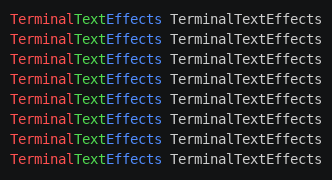
Every frame of the fade is replaced with the input colors, so nothing changes from one frame to the next: the text appears in its input colors, and the second word, which has none, has no color.

Built-in effects differ in what they do with uncolored characters in dynamic mode; Paint falls back to its gradient.
Whatever you choose, say so in your effect's documentation.
Where to go next
- Tutorial step 5: Color gives MySpray a final gradient and a scene that fades each character into it.
- Animation covers the scenes that colors are shown in.