The World
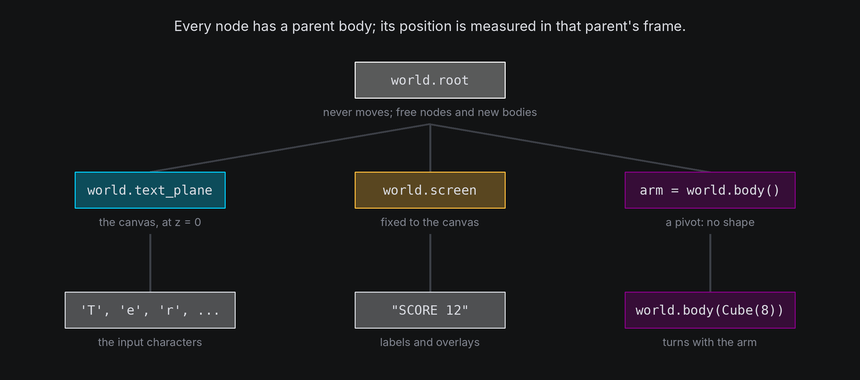
Every terminal has a world, terminal.world, and everything an effect shows lives in it. Characters and bodies are
both nodes in one tree: each has a parent, a position measured against that parent, and moves, turns and scales
along with it. This chapter introduces the tree and the three bodies every world starts with.
The idea
- A node is anything with a place in the world. Characters and bodies are both nodes (
SpatialNode). - A body is a node that other nodes can belong to. It has a position, a rotation and a scale, and optionally a shape, which gives it a surface to sit on and a mesh to draw.
- Every node has a parent body. A node's
positionis measured in its parent's frame, so when the parent moves, turns or scales, its children go with it. Frames and coordinates covers what the numbers mean. - A character is always a leaf: it can belong to a body, but nothing can belong to it.
Three bodies come with every world:
| Body | What it is | Who belongs to it |
|---|---|---|
world.root |
A shapeless body at the world origin that never moves. | Free nodes. node.detach() makes a node its child, and new bodies belong to it by default. |
world.text_plane |
A flat body at z = 0, the size of the canvas, facing the camera. Its surface positions are canvas coordinates. | Every input character, at first. |
world.screen |
A flat body fixed to the canvas, for labels and overlays. | Characters that must stay on their cells whatever the camera does. |
A 2D effect only ever uses the text plane, and never notices: with the text plane and the camera as the world made them, a character on it is drawn in exactly the cell its position names.
In TTE
The Nodes example tips the text plane back into a floor and swings a cube over it on an invisible arm. The arm is a shapeless body, and the cube is the arm's child, so turning the arm carries the cube round:
floor = self.world.text_plane
floor.turn_to(rotation_about("x", -70), frames=60, ease=easing.in_out_sine)

self.arm = self.world.body(at=(0, 6, 0))
self.cube = self.world.body(Cube(8), at=(26, 0, 0), parent=self.arm).draw(Shaded())
self.arm.spin("y", turns=1, frames=240, ease=easing.in_out_sine)
nodes.py
Save it in your community effects directory as nodes.py.
"""Nodes: the text plane tips back into a floor while a cube on an arm circles over it, then everything returns.

An Effect Guide example for The World chapter.
"""

from __future__ import annotations

from dataclasses import dataclass

from terminaltexteffects import easing
from terminaltexteffects.engine.base_config import BaseConfig
from terminaltexteffects.engine.base_effect import BaseEffect, BaseEffectIterator
from terminaltexteffects.engine.drawing import Shaded
from terminaltexteffects.engine.shapes import Cube
from terminaltexteffects.engine.tweens import rotation_about
from terminaltexteffects.utils import argutils


def get_effect_resources() -> tuple[str, type[BaseEffect], type[BaseConfig]]:
    """Return the command name, effect class, and configuration class TTE registers."""
    return "nodes", Nodes, NodesConfig


@dataclass
class NodesConfig(BaseConfig):
    """Configuration for the Nodes effect."""

    parser_spec = argutils.ParserSpec(
        name="nodes",
        help="The text tips back into a floor while a cube on an arm circles over it.",
        description="nodes | The text tips back into a floor while a cube on an arm circles over it.",
        epilog="Example: tte --canvas-width 80 --canvas-height 24 --anchor-text c nodes",
    )


class NodesIterator(BaseEffectIterator[NodesConfig]):
    """Produce the frames of the Nodes effect."""

    def __init__(self, effect: Nodes) -> None:
        """Show the text, build the arm and the cube, and queue the moves."""
        super().__init__(effect)
        self.world = self.terminal.world
        self.world.set_light("upper left")
        self.world.camera.set_perspective(2)  # Exaggerate depth, so the floor and the circle read as 3D.
        for character in self.terminal.get_characters():
            if character.input_symbol != " ":
                self.terminal.set_character_visibility(character, is_visible=True)

        # The text plane is a body like any other: tip it back into a floor, then stand it up again.
        floor = self.world.text_plane
        floor.hold(30)
        floor.turn_to(rotation_about("x", -70), frames=60, ease=easing.in_out_sine)
        floor.hold(240)
        floor.turn_to_rest(frames=60, ease=easing.in_out_sine)

        # An arm is a body with no shape: a pivot. The cube is its child, 26 units out along its x axis, so turning
        # the arm carries the cube round in a circle while the cube spins on its own.
        self.arm = self.world.body(at=(0, 6, 0))
        self.cube = self.world.body(Cube(8), at=(26, 0, 0), parent=self.arm).draw(Shaded())
        self.cube.scale = 0.01  # Scales must be positive: start too small to show.
        self.cube.hold(90).scale_to(1.0, frames=30, ease=easing.out_back)
        self.cube.spin("y", turns=3, frames=240, together=True)  # Starts with the scale-up.
        self.cube.scale_to(0.01, frames=30, ease=easing.in_back)
        self.arm.hold(90).spin("y", turns=1, frames=240, ease=easing.in_out_sine)

    def __next__(self) -> str:
        """Play until every body has finished, then remove the cube and its arm."""
        if not self.world.animating:
            if self.world.bodies:
                for body in self.world.bodies:
                    self.world.remove(body)
                self.update()
                return self.frame
            raise StopIteration
        self.update()
        return self.frame


class Nodes(BaseEffect[NodesConfig]):
    """The text tips back into a floor while a cube on an arm circles over it."""

    @property
    def _config_cls(self) -> type[NodesConfig]:
        return NodesConfig

    @property
    def _iterator_cls(self) -> type[NodesIterator]:
        return NodesIterator
- The text plane is an ordinary body. Its tweens are the same ones any body has, and every character on it goes along. None of the characters is active: the world places each one every frame, whether it ticks or not.
world.body(shape, at=, parent=)makes a body. With no shape, it is a pivot: a position, rotation and scale for other nodes to hang from. With a shape, it can also be drawn and carry characters on its surface.atis measured in the parent's frame. The cube sits 26 units along the arm's x axis, wherever the arm happens to point.- The cube spins on its own while the arm turns it round. A child's pose adds to its parent's: rotations, positions and scales all compose down the tree.
- At the end,
world.remove(body)takes each body out.world.bodieslists the bodies made withworld.body()that are still in the world.
Bodies
A body's pose is three properties, each measured in its parent's frame:
| Property | Set it now | Animate it |
|---|---|---|
position |
body.position = (x, y, z) |
A path: body.motion.new_path(...), the same Motion characters use |
rotation |
body.rotation = rotation_about("y", 30), or body.rotate("y", 30) to add a turn |
spin, settle, turn_to, turn_to_rest, random_pose |
scale |
body.scale = 2.0 |
scale_to |
Transforms explains how the three combine, and Animating in 3D covers the tweens. Bodies move along paths for the same reason characters do: a path can have easing, bezier curves, holds, events and live targets, so anything you know about moving a character works for a body.
pivot = self.world.body(at=(0, 0, -20))
trip = pivot.motion.new_path(speed=0.5, ease=easing.in_out_sine)
trip.new_waypoint(Vec3(30, 0, -20))  # In the pivot's parent's frame: here, the world's.
pivot.motion.activate_path(trip)
Body paths play inside update() along with the tweens, and world.animating stays true until they finish.
Parents and children
parent=onworld.body()sets a body's parent when it is made. Later,body.attach(other)moves it under another body, andbody.detach()makes it free again. Attaching and detaching covers both for characters and bodies alike.body.childrenlists the nodes that belong to a body, andbody.descendants()walks every node below it.- A body can't become its own ancestor; attaching it under one of its own descendants raises
ValueError.
Removing bodies
world.remove(body) takes a body out of the world and stops drawing it. Its children don't vanish with it: each one is
detached and stays exactly where it was, free in the world. Characters that should go back to the text plane need
attaching there (see Coming home). The root, the text plane and the screen can't be removed.
The screen
The screen is a flat body like the text plane, but it is fixed to the canvas. A character on the screen sits on the cell its position names whatever the camera does, and reads as facing the viewer in full light. Use it for captions, scores and labels next to a moving scene:
for column, letter in enumerate("ORBIT", start=4):
    label = self.terminal.add_character(letter, Coord(column, 2))
    label.attach(self.world.screen, at=Coord(column, 2))
    self.terminal.set_character_visibility(label, is_visible=True)
The screen never moves, turns or scales, and heights on it are ignored. Its characters still take part in the depth order: they paint at the camera's distance, like the text plane at rest.
Under the hood
Every body can convert between its frame and the world's:
point = cube.to_world((4, 0, 0), surface=False)  # A point in the cube's own axes, in world coordinates.
local = cube.from_world(point, surface=False)  # And back.
where = character.world_position  # Wherever its parent puts it, in world coordinates.
world_position, world_rotation and world_scale give a body's pose composed all the way up the tree.
surface=True (the default) reads positions as (column, row, height) on the body's surface instead, which is what
characters on it use; Frames and coordinates explains both.
At cell resolution
- A pivot is invisible. Only its children show where it is, which makes pivots the cheapest way to group things.
- Removing a body detaches its children where they are. A character left free in the world after its body goes keeps its last place, which may be off the canvas or behind the camera.
- A body's children move with it in the same frame. Characters and drawn cells never lag a frame behind the body they belong to.