Texture Mapping
A Textured look wraps text over a shape's faces, so the surface itself is made of letters. To do that, every point
on a face needs to know which character of the text belongs there. That lookup is called texture mapping.
The idea
Each face carries texture coordinates, usually called u and v: u runs across the face from 0 to 1, and v runs up it from 0 to 1. Any point on the face has a (u, v) position, however the face is turned or stretched on screen.
The shape turns (u, v) into a position in the text: a column and a row. TTE keeps the text at its natural size, about one character per column across and one per row down, and repeats it when the face is bigger than the text. Wrapped shapes, such as cylinders and spheres, run u all the way around, so the text continues across the seam.

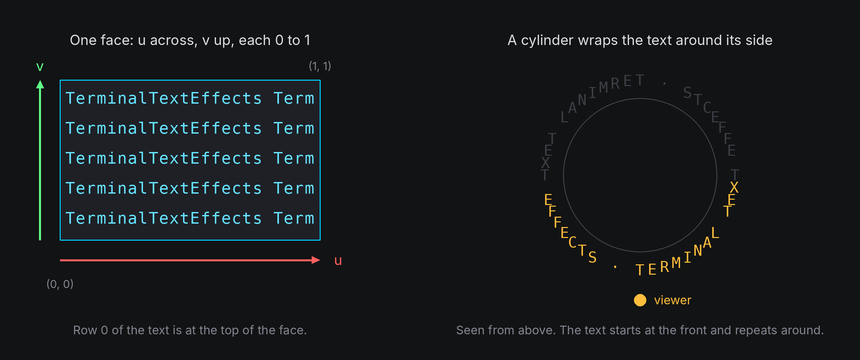
When a cell is filled, the world finds the (u, v) at the cell's center, looks up the character there, and draws it in a color from the light. So the text turns, tilts and foreshortens with the surface, while each cell still shows one upright character.
In TTE
The Texture example wraps a grid pattern, or the input text, over a cube and a sphere:
look = Textured() if self.config.text else Textured(GRID)  # Textured() wraps the input text.
cube = self.world.body(Cube(22), at=(-20, 0, 0)).draw(look)
sphere = self.world.body(Sphere(13, segments=32, rings=16), at=(20, 0, 0)).draw(look)
texture.py
Save it in your community effects directory as texture.py.
"""Texture: a grid pattern, or the input text, wrapped over a cube and a sphere.

An Effect Guide example for the Texture Mapping chapter.
"""

from __future__ import annotations

from dataclasses import dataclass

from terminaltexteffects import Textured, easing
from terminaltexteffects.engine.base_config import BaseConfig
from terminaltexteffects.engine.base_effect import BaseEffect, BaseEffectIterator
from terminaltexteffects.engine.shapes import Cube, Sphere
from terminaltexteffects.utils import argutils

# Four columns and two rows repeat over each face: a cell with a + at one corner and lines along two edges.
GRID = "+---\n|   "


def get_effect_resources() -> tuple[str, type[BaseEffect], type[BaseConfig]]:
    """Return the command name, effect class, and configuration class TTE registers."""
    return "texture", Texture, TextureConfig


@dataclass
class TextureConfig(BaseConfig):
    """Configuration for the Texture effect."""

    parser_spec = argutils.ParserSpec(
        name="texture",
        help="A grid pattern, or the input text, wrapped over a cube and a sphere.",
        description="texture | A grid pattern, or the input text, wrapped over a cube and a sphere.",
        epilog="Example: tte --canvas-width 80 --canvas-height 24 --anchor-text c texture --text",
    )
    text: bool = argutils.ArgSpec(
        name="--text",
        default=False,
        action="store_true",
        help="Wrap the input text instead of the grid.",
    )  # pyright: ignore[reportAssignmentType]
    "bool : Wrap the input text instead of the grid."


class TextureIterator(BaseEffectIterator[TextureConfig]):
    """Produce the frames of the Texture effect."""

    def __init__(self, effect: Texture) -> None:
        """Wrap the texture over both shapes and spin them."""
        super().__init__(effect)
        self.world = self.terminal.world
        look = Textured() if self.config.text else Textured(GRID)  # Textured() wraps the input text.
        cube = self.world.body(Cube(22), at=(-20, 0, 0)).draw(look)
        sphere = self.world.body(Sphere(13, segments=32, rings=16), at=(20, 0, 0)).draw(look)
        for body in (cube, sphere):
            body.rotate("x", 20)
            body.spin("y", turns=1, frames=360, ease=easing.in_out_sine)
        self.text_shown = False

    def __next__(self) -> str:
        """Spin the shapes, then swap them for the text."""
        if not self.world.animating:
            if self.text_shown:
                raise StopIteration
            for body in self.world.bodies:
                body.erase()  # The world hides its cells when it next paints.
            for character in self.terminal.get_characters():
                self.terminal.set_character_visibility(character, is_visible=True)
            self.text_shown = True
        self.update()
        return self.frame


class Texture(BaseEffect[TextureConfig]):
    """A grid pattern, or the input text, wrapped over a cube and a sphere."""

    @property
    def _config_cls(self) -> type[TextureConfig]:
        return TextureConfig

    @property
    def _iterator_cls(self) -> type[TextureIterator]:
        return TextureIterator


Textured()wraps the effect's input text.Textured("...")wraps any string, with lines separated by\n.- A grid shows the mapping clearly: watch the squares compress toward the sphere's edges, where the surface turns away.
- Each face of a
BoxorCubestarts the text at its own top left corner.PrismandPyramidrun the text around their sides.Cylinderwraps it all the way around, starting at the front.Spherewraps it round and from pole to pole, centered on the front likesurface.layout_text. - Faces without texture coordinates, such as prism and cylinder caps, are drawn in
back_color. back="dim"shows the far side through the spaces in the text (see Depth).- Each cell shows one character, so wide characters such as CJK can't be split across cells and are left blank.
Text over a solid fill
By default the text is the surface: each cell's symbol is drawn in a color from the light, with nothing behind it.

Give the look a background and every cell is filled with it first, as the cell's background color, and the text is
drawn on top in its ink. Blanks in the text, cells outside text that doesn't repeat, and faces without texture
coordinates all show the fill, so the shape reads as solid.
white = Ink(Color("#ffffff"), light=light)
spread = Ink(Gradient(...), spread=Gradient.Direction.HORIZONTAL, light=light)
cube = self.world.body(Cube(22), at=(-20, 0, 0)).draw(Textured(ink=white, background=purple))
sphere.draw(Textured(ink=spread, background=navy, repeat=False))
ink.py
Save it in your community effects directory as ink.py.
"""Ink: the input text drawn over solid, lit shapes, in one color on a cube and a gradient across the text on a sphere.

An Effect Guide example for the Texture Mapping chapter.
"""

from __future__ import annotations

from dataclasses import dataclass

from terminaltexteffects import Color, Gradient, Ink, Textured, easing
from terminaltexteffects.engine.base_config import BaseConfig
from terminaltexteffects.engine.base_effect import BaseEffect, BaseEffectIterator
from terminaltexteffects.engine.shapes import Cube, Sphere
from terminaltexteffects.utils import argutils


def get_effect_resources() -> tuple[str, type[BaseEffect], type[BaseConfig]]:
    """Return the command name, effect class, and configuration class TTE registers."""
    return "ink", InkDemo, InkConfig


@dataclass
class InkConfig(BaseConfig):
    """Configuration for the Ink effect."""

    parser_spec = argutils.ParserSpec(
        name="ink",
        help="The input text drawn over solid, lit shapes.",
        description="ink | The input text drawn over solid, lit shapes.",
        epilog="Example: tte --canvas-width 80 --canvas-height 24 --anchor-text c ink --light 1",
    )
    light: float = argutils.ArgSpec(
        name="--light",
        type=argutils.NonNegativeRatio.type_parser,
        default=0.0,
        metavar=argutils.NonNegativeRatio.METAVAR,
        help="How much shadow darkens the text: 0 glows, 1 darkens it as much as the shape.",
    )  # pyright: ignore[reportAssignmentType]
    "float : How much shadow darkens the text: 0 glows, 1 darkens it as much as the shape."


class InkIterator(BaseEffectIterator[InkConfig]):
    """Produce the frames of the Ink effect."""

    def __init__(self, effect: InkDemo) -> None:
        """Draw the text over a filled cube and sphere, and spin them."""
        super().__init__(effect)
        self.world = self.terminal.world
        light = self.config.light
        # The fill is each cell's background, lit from dark to bright like a Solid look.
        purple = Gradient(Color("#1a0020"), Color("#8A008A"), steps=12)
        navy = Gradient(Color("#001018"), Color("#006080"), steps=12)
        # One color on the cube. On the sphere, a gradient spread across the text keeps its colors on their letters.
        white = Ink(Color("#ffffff"), light=light)
        spread = Ink(
            Gradient(Color("#00D1FF"), Color("#ffffff"), Color("#ffd000"), steps=12),
            spread=Gradient.Direction.HORIZONTAL,
            light=light,
        )
        cube = self.world.body(Cube(22), at=(-20, 0, 0)).draw(Textured(ink=white, background=purple))
        sphere = self.world.body(Sphere(13, segments=32, rings=16), at=(20, 0, 0))
        sphere.draw(Textured(ink=spread, background=navy, repeat=False))
        for body in (cube, sphere):
            body.rotate("x", 20)
            body.spin("y", turns=1, frames=360, ease=easing.in_out_sine)
        self.text_shown = False

    def __next__(self) -> str:
        """Spin the shapes, then swap them for the text."""
        if not self.world.animating:
            if self.text_shown:
                raise StopIteration
            for body in self.world.bodies:
                body.erase()  # The world hides its cells when it next paints.
            for character in self.terminal.get_characters():
                self.terminal.set_character_visibility(character, is_visible=True)
            self.text_shown = True
        self.update()
        return self.frame


class InkDemo(BaseEffect[InkConfig]):
    """The input text drawn over solid, lit shapes."""

    @property
    def _config_cls(self) -> type[InkConfig]:
        return InkConfig

    @property
    def _iterator_cls(self) -> type[InkIterator]:
        return InkIterator

backgroundtakes aColor, the same on every face, or aGradient, which runs from unlit to fully lit like aSolidlook.Solid(background=True)fills a shape the same way without any text.Ink(color)is the text color: aColor, aGradient, orNonefor the TTE brand colors. The defaultInk()is the brand gradient following the light, the lookTexturedhas without a fill.spreadsays what a gradient runs along."light"picks a color by how lit the cell is. AGradient.Directionspreads it across the text instead, the way an effect's final gradient runs across the canvas, so each letter keeps its color as it travels round the shape.lightsays how much shadow darkens the text, from 0, the same color lit or not, to 1, as dark as the surface gets. Glowing text stays readable on the shadowed side. Lit text sits in the surface like paint. It doesn't apply to a gradient following the light, which is lit already.back="dim"shows the far side through blanks, which a fill would cover, so it can't be combined withbackground.- Characters attached to a filled body's surface are drawn over the fill too. See Riding a solid shape.
Attached text or textured surface
Text can be part of a 3D scene in two ways. Attaching puts each character on a body, as in
Attaching and detaching: the character keeps its own symbol and moves as a whole. A Textured look draws the
surface out of text: each cell samples the text where it lands. The Surfaces example shows the same words both ways.
surfaces.py
"""Surfaces: the same words attached as characters on the left and drawn as a textured surface on the right.

An Effect Guide example for the Texture Mapping chapter.
"""

from __future__ import annotations

from dataclasses import dataclass

from terminaltexteffects import Color, ColorPair, EffectCharacter, Textured, easing
from terminaltexteffects.engine.base_config import BaseConfig
from terminaltexteffects.engine.base_effect import BaseEffect, BaseEffectIterator
from terminaltexteffects.engine.shapes import Box
from terminaltexteffects.utils import argutils
from terminaltexteffects.utils.geometry import Coord


def get_effect_resources() -> tuple[str, type[BaseEffect], type[BaseConfig]]:
    """Return the command name, effect class, and configuration class TTE registers."""
    return "surfaces", Surfaces, SurfacesConfig


@dataclass
class SurfacesConfig(BaseConfig):
    """Configuration for the Surfaces effect."""

    parser_spec = argutils.ParserSpec(
        name="surfaces",
        help="The same words attached as characters and drawn as a textured surface.",
        description="surfaces | The same words attached as characters and drawn as a textured surface.",
        epilog="Example: tte --canvas-width 80 --canvas-height 24 --anchor-text c surfaces",
    )


WORDS = ("TERMINAL", "  TEXT  ", "EFFECTS ")
"""The words on both sides, one line each, padded to the same width so the texture repeats cleanly."""

LABEL = Color("#a0a0a0")


class SurfacesIterator(BaseEffectIterator[SurfacesConfig]):
    """Produce the frames of the Surfaces effect."""

    def __init__(self, effect: Surfaces) -> None:
        """Attach the words to one body, texture them over a thin box, and turn both."""
        super().__init__(effect)
        self.world = self.terminal.world
        self.extras: list[EffectCharacter] = []
        center = self.terminal.canvas.center
        width, height = len(WORDS[0]), len(WORDS)

        # Left: one character per letter, attached to a body with no shape. Each keeps its own symbol and moves as
        # a whole.
        self.sign = self.world.body(at=(-20, 0, 0))
        letters: list[EffectCharacter] = []
        for row, line in enumerate(WORDS):
            for column, symbol in enumerate(line):
                if symbol == " ":
                    continue
                coord = Coord(center.column - 20 - width // 2 + column, center.row + height // 2 - row)
                letter = self.terminal.add_character(symbol, coord)
                letter.animation.set_appearance(symbol, ColorPair(fg=Color("#00D1FF")))
                letters.append(letter)
        for letter in letters:
            letter.attach(self.sign)  # Without `at`, it stays where it is: on its cell until the body moves.
            self.terminal.set_character_visibility(letter, is_visible=True)
            self.active_characters.add(letter)
        self.extras += letters

        # Right: a thin box with the same words as its texture. Each cell samples the text where it lands.
        self.panel = self.world.body(Box(width, height * 2, 1), at=(20, 0, 0)).draw(Textured("\n".join(WORDS)))

        for body in (self.sign, self.panel):
            body.rotate("x", 15)
            body.hold(30).spin("y", turns=1, frames=360, ease=easing.in_out_sine).hold(30)
        self.label("attached", -20)
        self.label("textured", 20)
        self.text_shown = False

    def label(self, text: str, x: int) -> None:
        """Write `text` on the bottom row, under the body at `x`. Labels are plain characters on the text plane."""
        start = self.terminal.canvas.center.column + x - len(text) // 2
        for offset, symbol in enumerate(text):
            character = self.terminal.add_character(symbol, Coord(start + offset, self.terminal.canvas.bottom))
            character.animation.set_appearance(symbol, ColorPair(fg=LABEL))
            self.terminal.set_character_visibility(character, is_visible=True)
            self.extras.append(character)

    def __next__(self) -> str:
        """Turn both, then swap them for the text."""
        if not self.world.animating:
            if self.text_shown:
                raise StopIteration
            self.panel.erase()  # The world hides its cells when it next paints.
            for character in self.extras:
                self.terminal.set_character_visibility(character, is_visible=False)
            for character in self.terminal.get_characters():
                self.terminal.set_character_visibility(character, is_visible=True)
            self.text_shown = True
        self.update()
        return self.frame


class Surfaces(BaseEffect[SurfacesConfig]):
    """The same words attached as characters and drawn as a textured surface."""

    @property
    def _config_cls(self) -> type[SurfacesConfig]:
        return SurfacesConfig

    @property
    def _iterator_cls(self) -> type[SurfacesIterator]:
        return SurfacesIterator

- Attached characters keep their colors, scenes and symbols, and can fly home to their input cells afterward. Turned away, the letters still read upright, in reverse order.
- A textured surface is lit and hides what's behind it, but it can't hand its letters back: they belong to the world.
- Attach text that has to land somewhere. Texture text that decorates a shape.
surface.layout_text(characters)andTextured(text)both put text around a cylinder or sphere. On a sphere they agree on where the text goes: centered on the front, with the same rows.layout_textattaches each of your characters to one cell of the surface's grid, and the characters ride the surface as wholes.Texturedresamples the text into the drawn cells, so the letters stretch, repeat and shade with the surface, and a few land a column off. See Laying out text.
Under the hood
A mesh face's uvs give a (u, v) for each corner. rasterize blends them across
the face, correcting for perspective, and stores the result in each cell's Fragment.uv. The shape's
texture_cell(fragment) turns that into a fractional (column, row) in the text:
A custom shape can override texture_cell to lay its text out differently. Return None for faces that shouldn't be
textured. A shape that sets texture_centered = True, as Sphere does, returns the column and row from the middle of
the text instead of its top left corner, and the look centers the text there.
At cell resolution
- Text is sampled once per cell. Where a surface faces you squarely at its natural size, each character lands in its own cell. Where the surface is magnified, by perspective or by scaling up, neighboring cells sample the same character, and letters double up. Where it's shrunk or turned away, cells skip characters.
- Doubling is worst on the near side of a large shape. A gentler
perspectiveor a smaller shape helps.back="dim"doesn't: it only shows the far side through the near side's spaces. - Text needs space to read. A face 20 columns wide holds about 20 characters, and fewer as it turns.
- Bold, dense text such as capitals reads better on a surface than lowercase or punctuation.
Scrolling, repetition and text size
Textured(offset=(column, row)) adds an offset in text cells before sampling. Positive columns
scroll left; positive rows scroll up. repeat=True wraps the text in both directions.
repeat=False shows the text once and leaves the cells outside it blank. scale=2 doubles each
character's footprint in both dimensions; scale must be finite and positive. Row density follows
world.camera.row_scale, including when it differs from the usual tall-cell ratio.
Looks are immutable. Animate an offset by replacing the look each frame, without turning the body:
from dataclasses import replace
from terminaltexteffects import Textured

look = Textured("A scrolling message")
# In the iterator's __next__, with elapsed_frames advanced by the effect, before update():
body.draw(replace(look, offset=(elapsed_frames / 4, 0)))
For custom shapes, texture_cell continues to return rows in the default terminal cell ratio;
the renderer converts those rows to the camera's ratio before applying scale and offset.