3D in a Terminal
A terminal is a very coarse screen. An 80 by 24 terminal has fewer than 2,000 cells, each showing one symbol in one foreground color. A 3D scene has to read at that resolution, so it helps to know what survives and what doesn't before you design an effect.
The idea
Every frame, the world works out which cells each shape covers and draws one symbol in each. Two things decide how well a shape reads:
- Area beats outline. A filled face covers many cells, and its symbol and color say which way it faces. A thin
edge covers one cell per step, and at a slant it becomes a staircase of
/and\. Filled, shaded shapes read as solid at almost any size. Wireframes need room. - Size matters more than detail. A cube 6 columns wide has faces only a few cells across, so its corners and edges blur into a blob as it turns. At 12 columns it reads as a cube. At 24 it looks solid and turns smoothly.
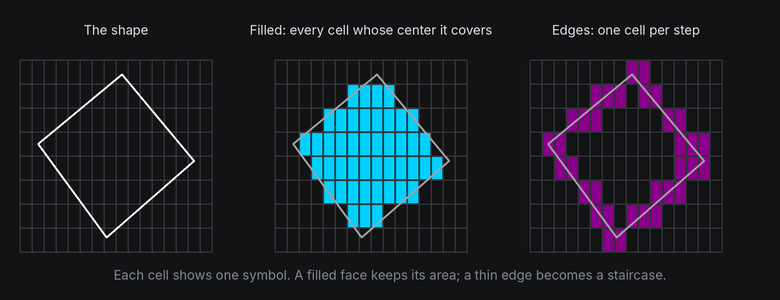
A cell is either covered or not. The world tests one point per cell, its center, so a face fills a solid patch of cells while a line that's thinner than a cell leaves a trail of single cells that steps sideways as it slants.
In TTE
The Cubes example turns three cubes of different sizes side by side:
for size, x in ((6, -28), (12, -10), (24, 18)):
    cube = self.world.body(Cube(size), at=(x, 0, 0)).draw(look)  # look is Shaded() or Wireframe().
    cube.rotate("x", 20)
    cube.spin("y", turns=1, frames=240, ease=easing.in_out_sine)
cubes.py
Save it in your community effects directory as cubes.py.
"""Cubes: three cubes of different sizes turn side by side, then the text appears.

An Effect Guide example for the 3D in a Terminal chapter.
"""

from __future__ import annotations

from dataclasses import dataclass

from terminaltexteffects import Body, Shaded, Wireframe, easing
from terminaltexteffects.engine.base_config import BaseConfig
from terminaltexteffects.engine.base_effect import BaseEffect, BaseEffectIterator
from terminaltexteffects.engine.shapes import Cube
from terminaltexteffects.utils import argutils


def get_effect_resources() -> tuple[str, type[BaseEffect], type[BaseConfig]]:
    """Return the command name, effect class, and configuration class TTE registers."""
    return "cubes", Cubes, CubesConfig


@dataclass
class CubesConfig(BaseConfig):
    """Configuration for the Cubes effect."""

    parser_spec = argutils.ParserSpec(
        name="cubes",
        help="Three cubes of different sizes turn side by side.",
        description="cubes | Three cubes of different sizes turn side by side.",
        epilog="Example: tte --canvas-width 80 --canvas-height 24 --anchor-text c cubes --wireframe",
    )
    wireframe: bool = argutils.ArgSpec(
        name="--wireframe",
        default=False,
        action="store_true",
        help="Draw only the edges of the cubes.",
    )  # pyright: ignore[reportAssignmentType]
    "bool : Draw only the edges of the cubes."


class CubesIterator(BaseEffectIterator[CubesConfig]):
    """Produce the frames of the Cubes effect."""

    def __init__(self, effect: Cubes) -> None:
        """Place three cubes and queue their turns."""
        super().__init__(effect)
        self.world = self.terminal.world
        look = Wireframe() if self.config.wireframe else Shaded()
        self.cubes: list[Body] = []
        for size, x in ((6, -28), (12, -10), (24, 18)):
            cube = self.world.body(Cube(size), at=(x, 0, 0)).draw(look)
            cube.rotate("x", 20)
            cube.spin("y", turns=1, frames=240, ease=easing.in_out_sine)
            self.cubes.append(cube)
        self.text_shown = False

    def __next__(self) -> str:
        """Turn the cubes, then swap them for the text."""
        if not self.world.animating:
            if self.text_shown:
                raise StopIteration
            for cube in self.cubes:
                cube.erase()  # The world hides its cells when it next paints.
            for character in self.terminal.get_characters():
                self.terminal.set_character_visibility(character, is_visible=True)
            self.text_shown = True
        self.update()
        return self.frame


class Cubes(BaseEffect[CubesConfig]):
    """Three cubes of different sizes turn side by side."""

    @property
    def _config_cls(self) -> type[CubesConfig]:
        return CubesConfig

    @property
    def _iterator_cls(self) -> type[CubesIterator]:
        return CubesIterator


world.body(Cube(size), at=(x, 0, 0))makes a body with a cube shape,xcolumns from the center..draw(look)tells the world to fill the cells the body covers.Shaded()picks a symbol and color for each face from its angle to the light.Wireframe()draws only the edges, with hidden edges dimmed.rotate("x", 20)tips the top toward you so you can see it, andspinqueues a full turn.
The small cube is a smudge in both looks. The middle one reads as a cube when filled, but its wireframe edges crowd together. Only the large one works as a wireframe.
Under the hood
draw() asks geometry3d.rasterize to fill the shape's faces into a
depth buffer, one entry per cell, keeping the nearest surface in each cell. A wireframe uses
geometry3d.wireframe instead, which walks each edge cell by cell and picks a line symbol from its slope. The
Depth and hidden surfaces chapter explains the buffer.
At cell resolution
- Aim for shapes at least 12 columns across, and 20 or more for wireframes and textured faces.
- Keep a few cells between shapes. Two shapes that touch on screen merge into one blob of symbols.
- Prefer a few large shapes to many small ones. They read better and cost less (see Performance).
- Text attached to a shape needs even more room than a surface: a character is one cell, so a 12 column face holds 12 characters across at most, and fewer as it turns away.