Attaching and Detaching
A node's parent decides what carries it. Attaching moves a node under another body, so that from then on it moves, turns and scales with that body; detaching sets it free in the world. Paths do the travelling in between, and a path can head for a target that is itself moving.
The idea
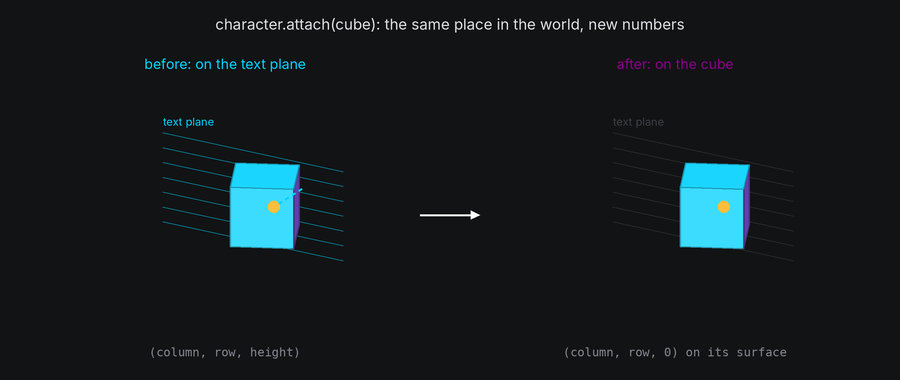
node.attach(body)makes the node a child ofbodywithout moving it: its position is converted into the new parent's frame, so it stays exactly where it is in the world, and on screen.node.attach(body, at=position)places it atpositionin the new parent's frame instead, now.node.detach()leaves the current parent and stays where the node is, free in the world. It's the same asnode.attach(world.root).- Attaching cancels the node's active path, because its waypoints were measured in the old frame.
- Characters and bodies attach the same way. A body keeps its place, and its rotation and scale stay relative to its new parent.
So attaching never moves anything by itself. To bring a character onto a body, fly it there with a path, then attach it where it lands. To send it home, attach it to the text plane where it is, then give it a path to its input cell.
In TTE

The Flight example sends every character to a random spot on a spinning cube. Each one lands, rides the cube, and then flies home to its input cell:
target = self.cube.surface.target(self.cube.surface.random_coord())
flight = character.motion.new_path(speed=1.2, ease=easing.in_out_sine, path_id="flight")
flight.new_waypoint(target, bezier_control=Vec3(column, row, 30))
character.event_handler.register_event(
    EventHandler.Event.PATH_COMPLETE, flight, EventHandler.Action.ATTACH, self.cube
)
flight.py
Save it in your community effects directory as flight.py.
"""Flight: the text flies onto a spinning cube, rides it for a while, and then flies home.

An Effect Guide example for the Attaching and Detaching chapter.
"""

from __future__ import annotations

import random
from dataclasses import dataclass

from terminaltexteffects import EffectCharacter, EventHandler, easing
from terminaltexteffects.engine.base_config import BaseConfig
from terminaltexteffects.engine.base_effect import BaseEffect, BaseEffectIterator
from terminaltexteffects.engine.drawing import Shaded
from terminaltexteffects.engine.shapes import Cube
from terminaltexteffects.engine.tweens import rotation_about
from terminaltexteffects.utils import argutils
from terminaltexteffects.utils.geometry3d import Vec3


def get_effect_resources() -> tuple[str, type[BaseEffect], type[BaseConfig]]:
    """Return the command name, effect class, and configuration class TTE registers."""
    return "flight", Flight, FlightConfig


@dataclass
class FlightConfig(BaseConfig):
    """Configuration for the Flight effect."""

    ride_frames: int = argutils.ArgSpec(
        name="--ride-frames",
        type=argutils.PositiveInt.type_parser,
        default=120,
        metavar=argutils.PositiveInt.METAVAR,
        help="Frames the text rides the cube once every character has landed.",
    )  # pyright: ignore[reportAssignmentType]
    "int : Frames the text rides the cube once every character has landed."

    parser_spec = argutils.ParserSpec(
        name="flight",
        help="The text flies onto a spinning cube, rides it, and flies home.",
        description="flight | The text flies onto a spinning cube, rides it, and flies home.",
        epilog="Example: tte --canvas-width 80 --canvas-height 24 --anchor-text c flight --ride-frames 120",
    )


class FlightIterator(BaseEffectIterator[FlightConfig]):
    """Produce the frames of the Flight effect."""

    def __init__(self, effect: Flight) -> None:
        """Build the cube and give every character a flight to a live target on it."""
        super().__init__(effect)
        self.world = self.terminal.world
        self.world.set_light("upper left")
        self.cube = self.world.body(Cube(24), at=(0, 0, -30)).draw(Shaded())
        self.cube.rotation = rotation_about("x", 20)
        self.cube.spin("y", turns=6, frames=1200, local=True)

        self.waiting: list[EffectCharacter] = []
        for character in self.terminal.get_characters():
            if character.input_symbol == " ":
                continue
            self.terminal.set_character_visibility(character, is_visible=True)
            # A target is a spot on the cube's surface that moves with the cube. The path reads where it is every
            # tick, so the character lands on the spot however far the cube has turned meanwhile.
            target = self.cube.surface.target(self.cube.surface.random_coord())
            flight = character.motion.new_path(speed=1.2, ease=easing.in_out_sine, path_id="flight")
            # The control point is on the text plane, 30 units toward the viewer, so the character rises off it first.
            column, row = character.input_coord.column, character.input_coord.row
            flight.new_waypoint(target, bezier_control=Vec3(column, row, 30))
            # On landing, become the cube's child where it is: from then on the character turns with the cube.
            character.event_handler.register_event(
                EventHandler.Event.PATH_COMPLETE, flight, EventHandler.Action.ATTACH, self.cube
            )
            self.waiting.append(character)
        random.shuffle(self.waiting)
        self.total = len(self.waiting)
        self.ride = self.config.ride_frames
        self.going_home = False

    def go_home(self) -> None:
        """Move every character back onto the text plane where it is, and fly it to its input cell."""
        for character in self.terminal.get_characters():
            if character.input_symbol == " ":
                continue
            # attach() without `at` keeps the character's place in the world, so it doesn't jump. Its position is
            # now on the text plane, and a path there can head for its input cell.
            character.attach(self.world.text_plane)
            home = character.motion.new_path(speed=1.0, ease=easing.in_out_cubic, path_id="home")
            home.new_waypoint(character.input_coord)
            character.motion.activate_path(home)
            self.active_characters.add(character)
        self.cube.cancel()
        self.cube.scale_to(0.05, frames=60, ease=easing.in_back)
        self.going_home = True

    def __next__(self) -> str:
        """Launch a few characters a frame, ride, then send everything home and end once it's there."""
        for _ in range(4):
            if self.waiting:
                character = self.waiting.pop()
                character.motion.activate_path("flight")
                self.active_characters.add(character)
        if not self.waiting and not self.going_home and len(self.cube.children) == self.total:
            self.ride -= 1
            if self.ride <= 0:
                self.go_home()
        if self.going_home and not self.active_characters and not self.world.animating:
            if self.cube in self.world.bodies:
                self.world.remove(self.cube)
            else:
                raise StopIteration
        self.update()
        return self.frame


class Flight(BaseEffect[FlightConfig]):
    """The text flies onto a spinning cube, rides it, and flies home."""

    @property
    def _config_cls(self) -> type[FlightConfig]:
        return FlightConfig

    @property
    def _iterator_cls(self) -> type[FlightIterator]:
        return FlightIterator
tte --input-file concept_input.txt --canvas-width 80 --canvas-height 24 --anchor-text c flight --ride-frames 120
surface.target(position)is a live target: a spot on the cube's surface that moves with the cube. A path heading for it reads where it is on every tick, so the character arrives on the spot however far the cube has turned in the meantime.- The flight's waypoint and control point are measured in the character's frame, the text plane. The control point is above the character's own cell, 30 units toward the viewer, so each character rises off the text before it heads away.
- The
ATTACHaction attaches the character to the cube when the flight completes. It keeps the character's place, which is on the target, so the character is now on the cube's surface and turns with it. - Riding needs no path. A character on a moving body is placed by the body every frame, so the riders don't even need to be active.
len(self.cube.children)counts the riders. It reaches the total once every character has landed.
Live targets
Any node can be a waypoint. A path heading for a node follows it to wherever it is when the character arrives:
| Target | Made with | Follows |
|---|---|---|
| A spot on a surface | body.surface.target(column, row, height), or target(position) |
That spot, as the body moves, turns and scales |
| A body | The body itself | The body's origin |
| A character | The character itself | Wherever that character is |
chase = character.motion.new_path(speed=0.8)
chase.new_waypoint(leader)  # Catch up with another character, wherever it goes.
A path measures its length when it is activated, with each live target where it is at that moment, so it takes the same number of frames however the target moves afterward. Each tick reads the target again and places the character that far along the way to where the target is now. It arrives on the spot exactly when the path finishes, even when the target moves quickly.
Bezier control points can be live targets too. A curve bends toward wherever its control node is on each tick.
Coming home
A character that leaves the text plane keeps its input_coord, so going home is two steps:
character.attach(self.world.text_plane)  # Where it is: its position is now on the text plane.
home = character.motion.new_path(speed=1.0, ease=easing.in_out_cubic)
home.new_waypoint(character.input_coord)  # A Coord means height 0.
character.motion.activate_path(home)
The character flies from wherever it was, on any body or free, back down onto the text plane and across to its cell. As long as the text plane and the camera are back at their starting pose when it arrives, the character is drawn in exactly its input cell.
To put a character home at once, attach it there: character.attach(world.text_plane, at=character.input_coord).
Events
| Event | When | The caller is |
|---|---|---|
ATTACHED |
A node is attached to a body other than the root | The new parent |
DETACHED |
A node leaves a body other than the root | The old parent |
A move from one body to another triggers DETACHED and then ATTACHED. node.detach() triggers only DETACHED, and
attaching a free node triggers only ATTACHED.
Two node actions do the same as the methods, so a chain of paths and scenes can move a node between bodies:
| Action | Target | Does |
|---|---|---|
ATTACH |
A body | node.attach(body), keeping its place |
DETACH |
None | node.detach() |
Bodies have event handlers too, with the node actions: ACTIVATE_PATH, DEACTIVATE_PATH, SET_COORDINATE,
ATTACH, DETACH and CALLBACK. A body can land on another body at the end of its own path, exactly as a character
does.
Detaching into the world
A free node is a child of world.root, so its position is a world point (x, y, z). That suits motion that belongs to
no body: debris thrown off a spinning shape, a character falling away from the text.
character.detach()  # Same place, now measured in world units.
fall = character.motion.new_path(speed=0.6, ease=easing.in_quad)
fall.new_waypoint(Vec3(character.world_position.x, -60, character.world_position.z))
character.motion.activate_path(fall)
world.remove(body) detaches every child of the body too, each one where it is.
Under the hood
attach without at works out the node's world position with its old parent's to_world, then converts it into the
new parent's frame with from_world. On a body with a surface, that is the surface position nearest the point, with
its height off the surface. The node's place in the world is unchanged, to within rounding, so it lands in the same
cell on the next frame.
A body's rotation and scale are not converted: they stay relative to whichever parent the body has. Attaching a body under a turned parent turns it with the parent at once. Set its rotation in the same frame to compensate when that matters.
At cell resolution
- Attaching mid-flight, at the end of a path, never jumps. Attaching with
atjumps at once, to the new place. - A character attached to the back of a shape is hidden by the shape's drawn cells in front of it, or, without a
drawn shape, can be hidden by
hide_facing_away(see Depth). - A live target that leaves the canvas takes its followers with it. They are drawn wherever they are, even off screen, and can't be seen from behind the camera.